Variance Reporting
Variance Report Enhancements
There are three new features within the configuration of a variance report and two new report kick-off options.
New variance report configuration options
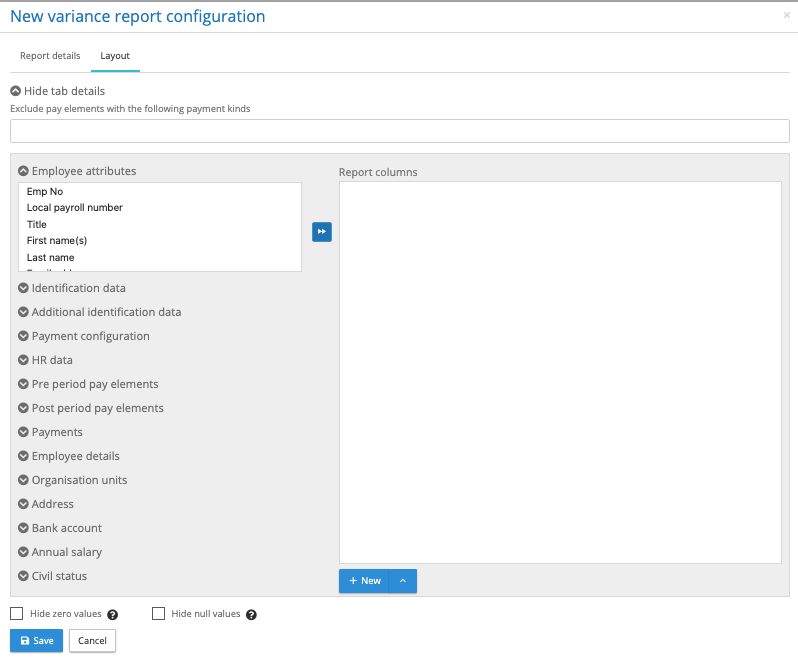
Exclude pay elements with the following payment kinds – Click on the box below this heading, it will show of list of pre-processing pay element kinds that could be excluded from the report. Incrementally add payment element kinds to be excluded, as each one is added the list of permissible values will change in the pre-processing period pay elements.
Hide Null Values – At the bottom of the report configurator is a checkbox called hide null values. This will remove any columns from the tabular report where all of the results for a given pay element are nulls (no value) in both the from period and to period. Please note a zero is regarded as a value. For the list report any employee with a pay element a null value will be excluded from the report.
Hide zero values – At the bottom of the report configurator is a checkbox called hide zero values. This will remove any columns from the tabular report where all of the results for a given pay element are zero in both the from period and to period. For the list report any employee with a pay element holding a zero value will be excluded from the report.
Variance report kick-off enhancements
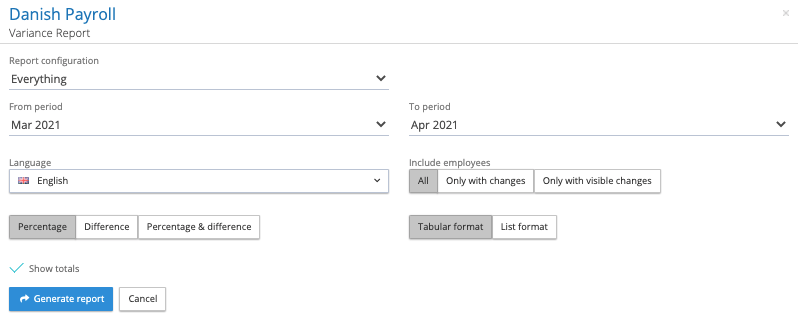
Include Employees – There are three choices
All – The report will include all active employees.
Only with changes – It will include all employees that have a change in value for any of the selected or unselected pay elements for that payroll for that pay period.
Only visible change – It will include all employees that have a change in value for only those selected pay elements requested in the report for that payroll and pay period
Show totals – For the tabular report add totals to the pay element columns.