Recording Employee Salary
Recording Employee Salary Type
IPPEX has the following salary frequencies:
- Annual
- Quarterly
- Monthly
- Weekly
- Daily
- Hourly
As part of the Version 1.34 deployment the existing annual salary values recorded in all tenancies will be migrated to the new annual salary type. Each of the salary frequency has three fields, effective date, salary (value) and an optional currency override. All payrolls have a defined payroll currency, there are circumstances where employees have a contracted salary rate in an alternative currency. It is now possible to edit a salary via the UI and add a currency override to the value.
The employee salary user interface has been changed to include salary frequency and last update period.
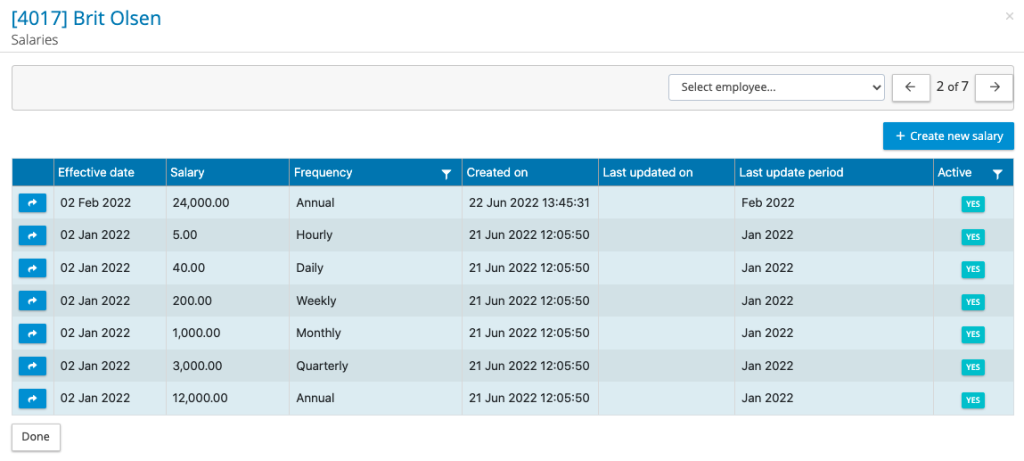
An employee can have multiple salary frequencies, salary values can be uploaded via the combined upload or entered via the UI. To view the salary, click on the action button next to the salary, it will open the following screen.
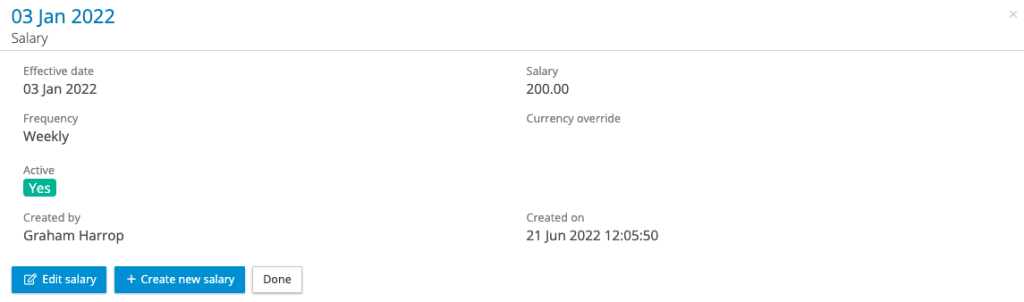
A salary value can be edited; however, the effective date and frequency cannot be changed. To add the salary, override to a record this can only be achieved through the UI. When the salary record has been edited, the system will tag that edit with the active changes period.
Reporting Inactive Salaries – If a salary has been entered incorrectly, it can be made inactive. The following describes the reporting rules for inactive salaries.
When a salary has been edited to be inactive it will be tagged with the changes reporting period. The changes report will include the salary record that has been made inactive as well as the prior effective date salary record. This provides the information to the local provider organisation with the data to reset the salary. A new salary can be entered to replace the inactive salary record with the same or different effective date, this new record will also be reported.
For variance and all data reports – when a salary has been configured/assigned to the report, when the report is run for a particular pay period, the system will return the salary value that has the effective date closest to the pay date.
Salary Local Codes – Salary frequencies can be assigned local codes, enabling the substitution of the frequency name with local code in the flexible changes report.

The flexible changes report has a filter option to select local code, this will substitute the IPPEX system salary frequency name with the Local Code.