Payroll List
Payrolls is a list all of the active and inactive payrolls for a client tenancy. The grid is a responsive design, the number of columns of information provided will depend on the size of your browser window. Payroll is used extensively for managing the pay data, reporting and employee users.
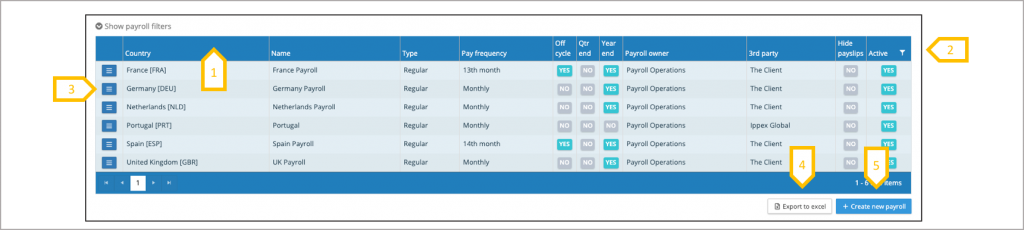
- Re-order list by clicking on a column heading
- List opens on active payrolls use filter to show in-active payrolls
- Payroll action button is used to access all payroll functions
- Export complete list of payrolls to Excel
- When a new payroll is required, click on create new payroll and follow the payroll set-up process
The payroll list summarises some of the payroll settings, full details on the payroll configuration can be obtained through the payroll action button to view payroll or edit payroll, dependent on the users permissions.
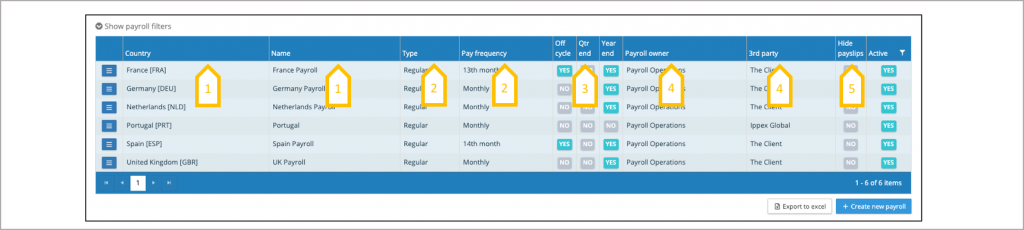
- Country and name, shows the country for the payroll and the name given to the payroll.
- The type of payroll is linked to the task template used for the payroll tasks and the pay frequency drives the payroll calendar.
- Off-cycle, quarter-end and year-end (YES/NO) shows if tasks have been enabled for these additional processing functions.
- Payroll owner is the principle person responsible for the payroll deliver and 3rd party is the organisation processing the payroll.
- Hide payslips (YES/NO) indicates if the hide new e-payslips function is activated.
Payroll Action Button
The payroll action button provides a list of payroll functions.
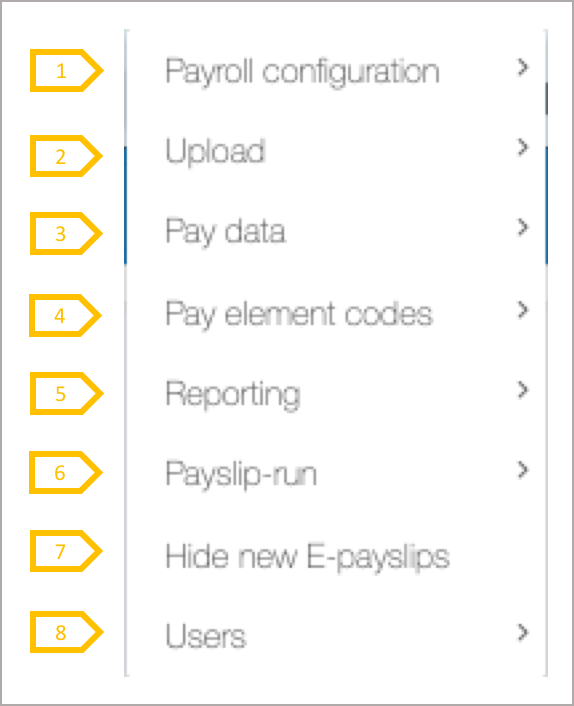
- Payroll configuration is used to edit a payroll, change the task configuration, amend or create payroll calendars and task calendars.
- Uploading employee record data, employee details, cost centres, pre and post processing data.
- View a list of pay elements and employee details. View employees on a payroll and their pay period data data.
- Pay element codes, configured pay element groupings and pay element GL code configurations
- Run payroll reports and create/amend payroll report configurations. Enables and update FX rates.
- Uploading employee payslips/documents and managing the payslip/document run configurations.
- When uploading payslips, new payslips can be hidden from employee users until needed to be released.
- Viewing and managing employee users and viewing the list of system users who have access to the payroll.