Pay Element Groups
Pay element grouping and exchange rates enables multi-payroll and multi-pay period reporting in any currency. All pay elements are defined locally at a payroll level, to group pay data in a common format requires pay element groupings. The system offers two levels of report, pay element group and pay element sub groups. Pay element groups are assigned a payment type, this defines the two parties for the pay element e.g. employer to employee. The tenancy administrator has the authority to define set-up the pay element groups, sub-groups and payment types.
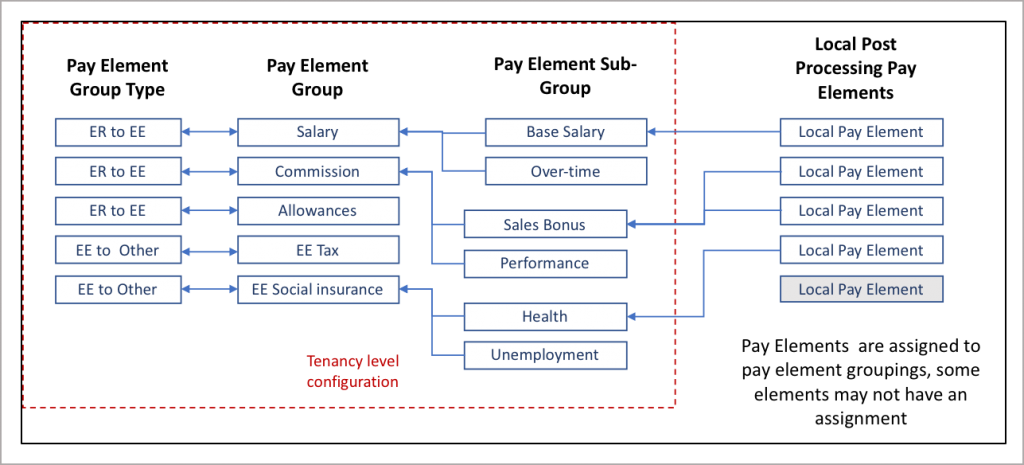
Pay element groups are assigned to post processing pay elements. The IPPEX system is a store and report system, where individual gross payments and deductions are uploaded as well as the totals. It is important to establish groupings for totals separately from individual pay elements, so these can be segregated in a report and data is not counted twice when aggregating the pay element values. Pay elements are assigned to pay element sub-groups, and through that connection they inherit the pay element group and payment type.
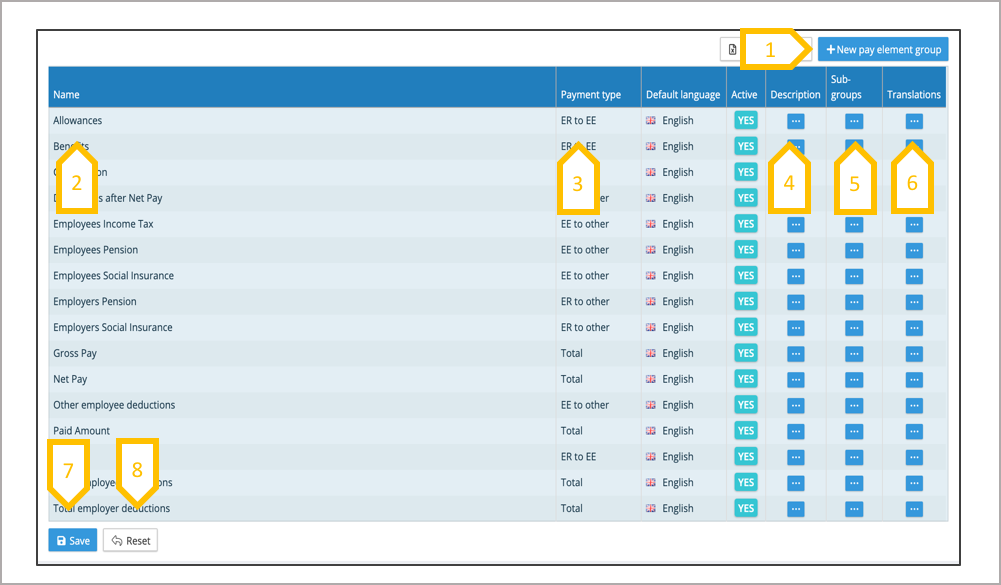
- Click + new pay element group.
- Add a description.
- Select payment type.
- Add a description if needed.
- Create pay element sub-groups.
- Add any translations to the pay element group name.
- Continue with the process of added or editing the groups and slick on save to commit all of the changes.
- Reset cancels all of the additions and changes since the last save.
Editing Pay Element Groups
A pay element group has a name, this has to be unique. The pay element group name can be edited once created, please note if it has been assigned to a pay element on a payroll if the meaning of the name changes it will affect the global reporting. The system allows for multiple changes to be made to the list, these changes do not take effect until the save button has been actioned. Local pay elements which are of the same type vary in description, the pay element group and sub group defines them globally,
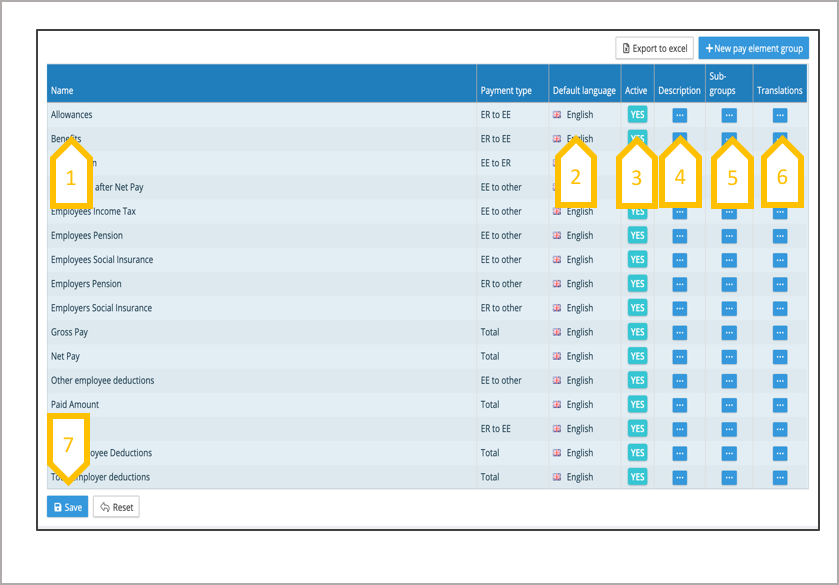
- Edit the name of the group.
- Correct the payment type.
- Make a group inactive, so it cannot be used in any new pay element assignments. All existing assignment will be remain in place.
- Add a description to the group.
- Add or edit the pay element sub-groups.
- Add translations to the group name.
- Save all of the edits.
Pay Element Sub-Group
A pay element group has a name, this has to be unique. The pay element group name can be edited once created, please note if it has been assigned to a pay element on a payroll if the meaning of the name changes it will affect the global reporting. The system allows for multiple changes to be made, these changes do not take effect until the save button has been actioned.
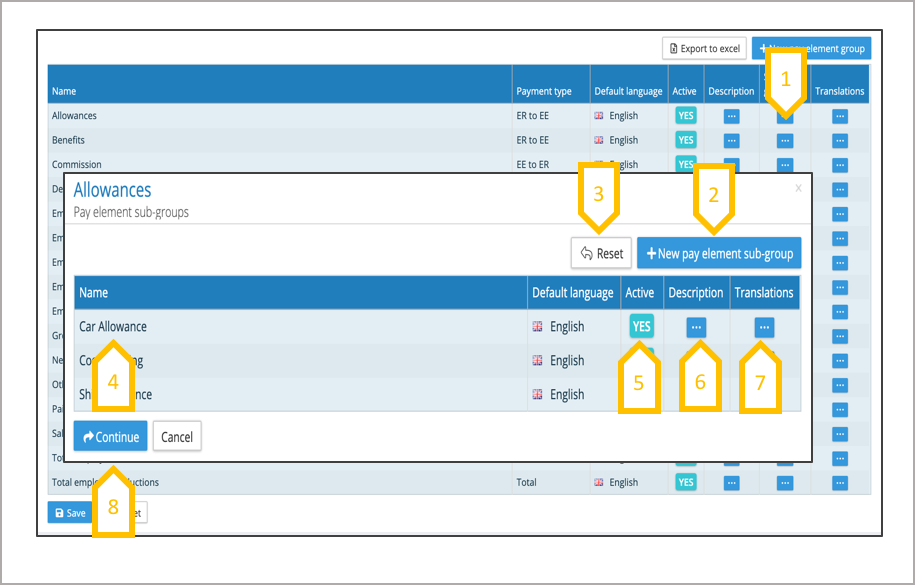
- Click on the pay element sub group action button next to the pay element group.
- Add a new pay element sub group.
- Reset cancels any changes since the last save.
- Edit existing pay element sub-group name.
- When a sub-group is set to in-active, all existing pay element assignments to this sub-group will be kept, the sub-group will not appear in the available list for any new assignments.
- Add a description.
- Add translations to the pay element sub group name.
- Click on continue to keep the changes you have made and then click on save on the pay element group page.
Pay Element Group Translations
The pay element group and sub-group names can be translated into any language enabled for the client tenancy. Reports such as the transaction report allow for the select of a reporting language. If a translation has not been added to the group names for a given language, and that language is selected for a report, the system will substitute with the default language.
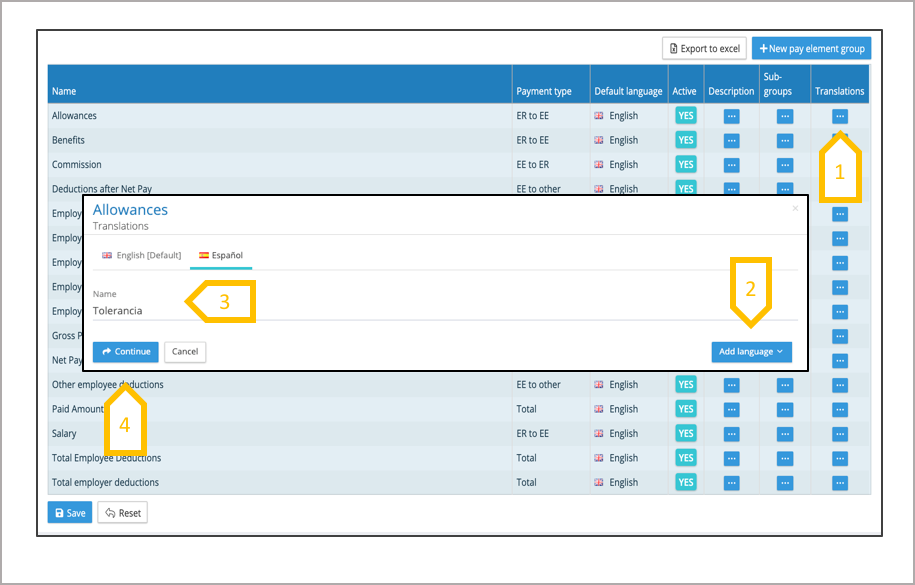
- Click language action button for the pay element group.
- Click on add language, and select from the list of languages enabled.
- Add the translated name.
- Click on continue to confirm the changes, and don’t forget to press save on the group page to commit all of the changes made to the pay element groups.
Payment Type
A pay element group has a name, this has to be unique. The pay element group name can be edited once created, please note if it has been assigned to a pay element on a payroll if the meaning of the name changes it will affect the global reporting. The system allows for multiple changes to be made to the list, these changes do not take effect until the save button has been actioned. Local pay elements which are of the same type vary in description, the pay element group and sub group defines them globally, it also defines the payment type.
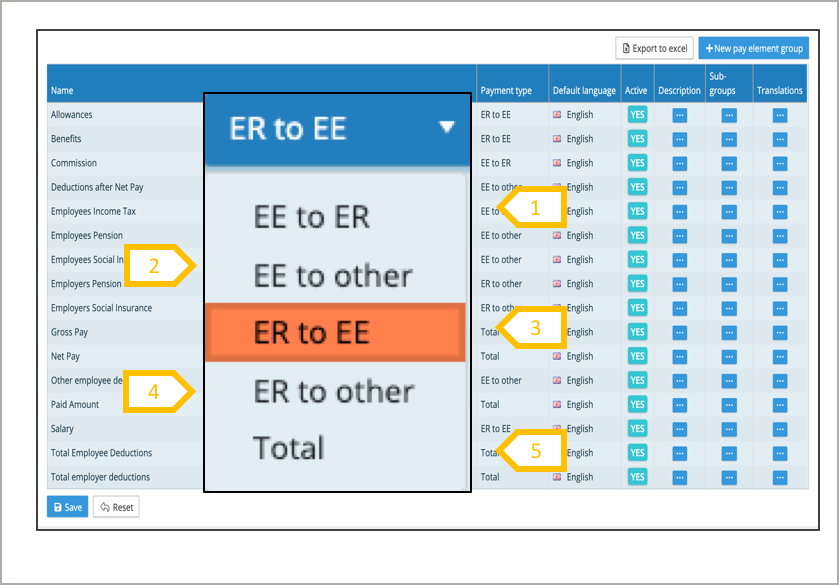
- EE to ER (employee to employer) these are associated with schemes or loans where an employee has a deduction to the employer.
- EE to Other (employee to other) are statutory deductions (e.g. taxes) or payments to third party pension schemes.
- ER to EE (employer to employee) these are gross payments such as salary or commission.
- ER to Other (employer to other) these are payments to statutory bodies such as social insurance.
- Total – These are used for Total Gross Pay, Total Net Pay, Total Deductions.