Pay Element Group Upload
In addition to providing a pay element group upload, a new payment type has been added called Notional. For some payrolls there are pay elements which are notional values, they are not part of the employee’s pay or deductions but are required for other reasons such as generating GL Journal entries. These can now be classified with a payment type of Notional.
The pay element group upload will populate the pay element group, description and payment type, pay element sub-groups can only be added through on-screen edits.
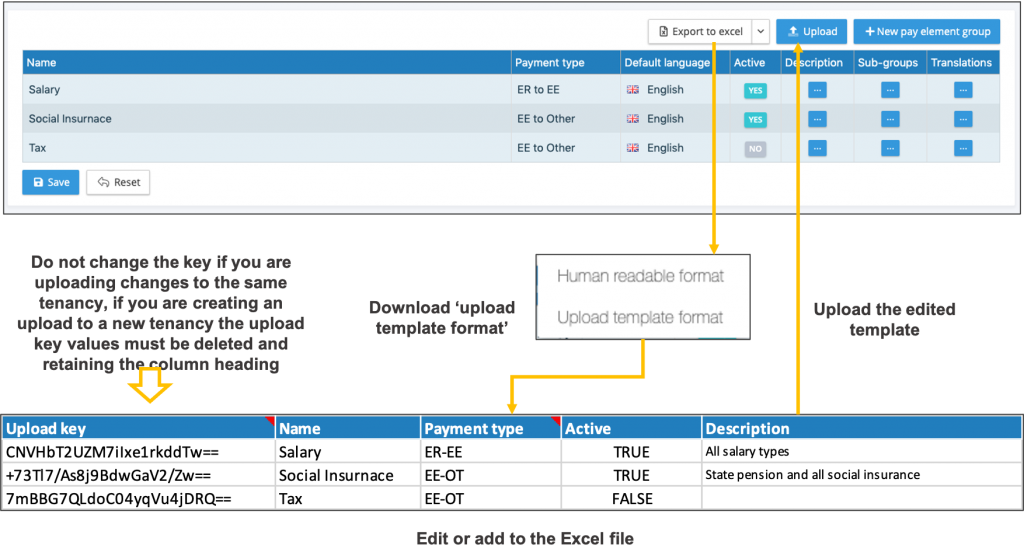
The process is as follows:
- Click on the pay element groups function
- Expand the Export to Excel button
- Select upload template format, this will download a template, if you already have a number of pay element groups set-up these will be included in the download file.
- The Excel download has a fixed number of columns and headings which are used by the system to upload the pay element groups, description and payment type.
- For all existing values in the pay element grouping, there is a reference key, do not change this value as it is used by the system to match the line item in the Excel file to the pay element group entry.
- Pay element groups, description and payment type can be edited. Inactive codes can also be set to active.
- New line items can be added to the template for these they will have a blank reference key, so the system recognises that they are to be added. Each new pay element group must have the word TRUE entered to the active column.
- Click on the upload button and select the completed template, the system will list those items that have changes, and new line items with the option to select all or to select specific line items.
- By editing the name of an existing pay element group it will change the reporting output for any pay element that had been assigned to that group.