Organisation Units
Organisational units link the employee data to the GL Journal report. Organisational units can also be used for reporting purposes (see transaction report). IPPEX Cloud can be configured to support up to five organisational units. Under System Administration there is a menu item for the set-up and maintenance of organisational units. Each organisation unit should be configured with a list of allowable values. During the upload process of employee organisation unit values for a given pay period, the system will deliver an error if the value does match those in the list.

- In this example three of the organisation units have been assigned a unit name (enabled).
- Each organisation unit is given a name.
- Click on the action button to review, edit or add organisation unit values.
- Click on save when all of the changes have been made or click on reset to return the set-up to the last save.
Organisation Unit Values
Organisation units are set up at a tenancy level, a value within a unit can be used in one or a number of payrolls. Each organisation unit has a list of permissible values (names), each of these can have a description. An organisation unit value cannot be deleted as it may have been used in a payroll, it can be made inactive.
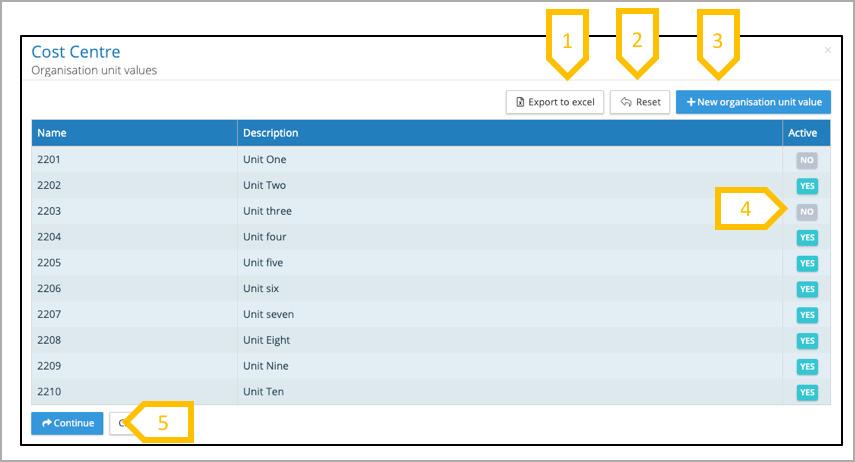
- Organisation unit values can be exported to Excel.
- Any changes can be reset to the last save.
- Add new organisation unit value.
- Set a value as inactive.
- Click on continue when you have made all of your changes, and press save on the next screen to commit those changes.