IPPEX Cloud V 2.08.0 Release Notes

Introduction
Version 2.8.0 includes the creation of a Payslip Manifest configurator. It also includes enhancements to the time/unit reporting capabilities and to the messenger system. Finally, we have added the ability for fix format uploads for payroll and tenancy 3rd Party Payments.
Payslip Manifest
Version 2.8.0 introduces a configurable Payslip Manifest which allows for the automatic creation of a payslip/document manifest when performing a PDF document run. This payslip/document manifest can accompany a ZIP File of payslips that can them be used to distribute payslips within HRIS systems.
To create a manifest configuration a tenancy administrator can do this by going to Administration > SFTP > Manifest configurations:
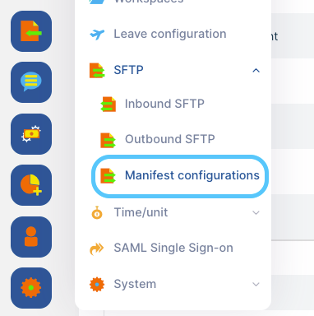
Once selected you are able to select the following column types to build a manifest:
- Document type
- Employee Number
- Employee Name
- Payroll Name
- PECI Pay Group
- Pay Date
- Last Date of Pay Month
- Payroll Currency
- Net Pay
- Gross Pay
- File Name
- Constant Value
- Timestamp
Any of these columns can be given custom column titles and the pay date can have offsets applied to the date that pulls through on the manifest.
You also have the ability to have the manifest appear in or outside of the payslip ZIP, as well as in a CSV or XLSX format. The manifest will also be linked to an outbound SFTP configuration allowing for automatic secure file transfers.
Increase Time/Unit Attribute Limit from 20 to 30
Time/Unit Attributes have now had their limit expanded from 20 to 30. This means 30 attributes can now be mapped and loaded as well as able to be applied to Time/Unit Report configurations.
Messenger Export File
The Messenger export file has been amended to now reflect the ‘last message on’ and ‘last message from’ fields.
3rd Party Payments Uploads
3rd Party Payments can now be uploaded via a fixed format upload that contains all of the active 3rd Party Categories for the payroll.
In the 3rd Party Payments section of a payroll you now have the ‘Upload template format’ and ‘Upload’ functionalities (similarly structured to other upload interfaces on IPPEX Cloud):
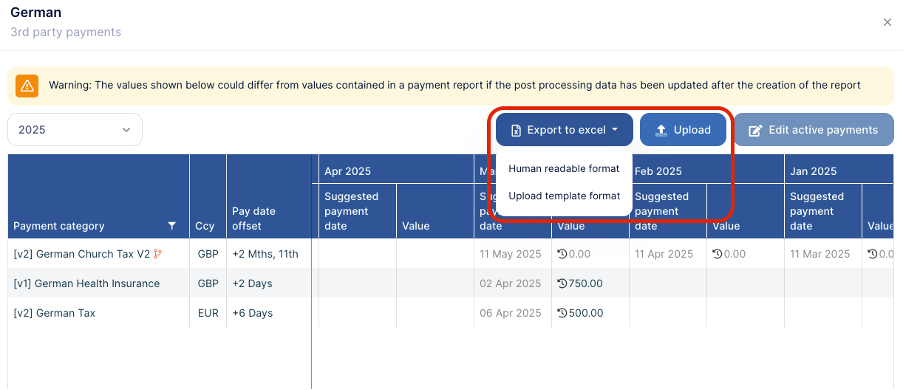
In the upload template, you will have to complete columns B-D:
Column B: The 3rd Party Payment Configuration you would like to populate a value
Column C: The Supplementary Period Type (leave blank if not used for supplementary period)
Column D: The Value to be loaded