IPPEX Cloud Overview
Companies, contacts, users, user groups and payroll groups
A system user’s access to the system is controlled by their user type, their primary and other roles, the user group and payrolls group they are assigned to. It is important to understand how a payroll is linked to a user and what privileges a user can be given. The IPPEX system offers flexibility, as a consequence there are multiple ways in which to achieve a similar outcome.
Payroll users, internal user and third party users
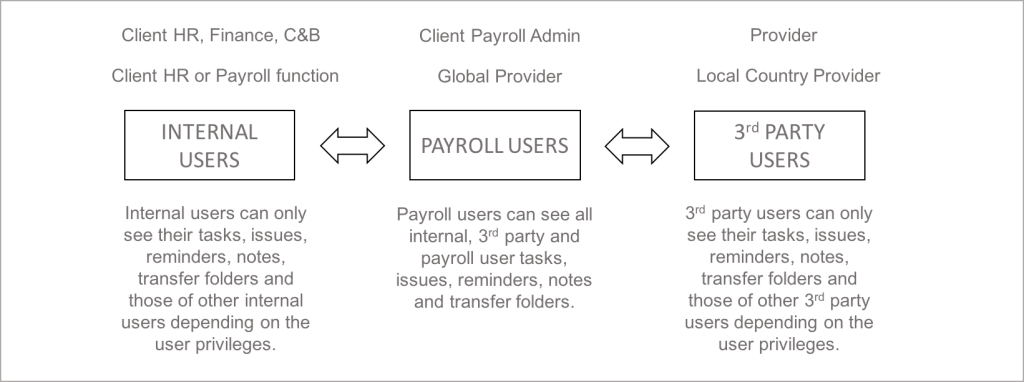
IPPEX Cloud enables the separation of organisation types through users types. For example segregating client users, global provider users and local provider users. Each of these parties being assigned to one of the following user types, internal, third party and payroll. The assignment of the user type will depend on who is owning the delivery and the level of interaction between the parties. The payroll user type has the most control over the system, and typically is assigned to the organisation responsible for owning the end to end payroll process.
Aggregator Option
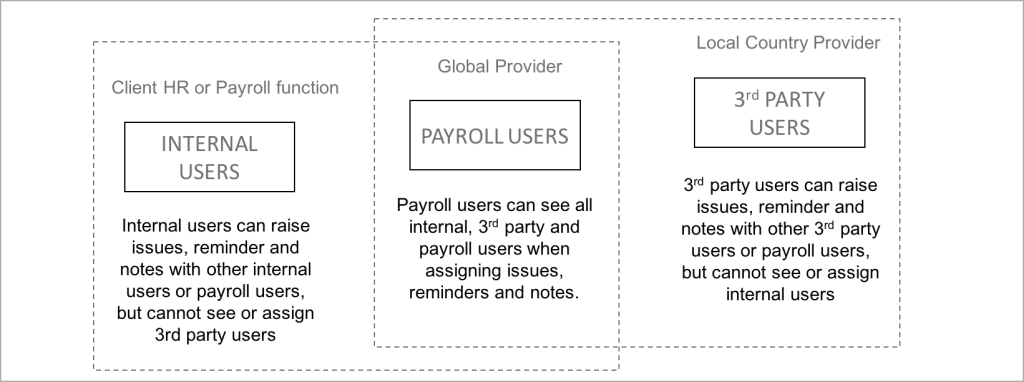
IPPEX Cloud can be implemented so Internal users cannot see 3rd Party User when creating issues, reminders and notes. This is the aggregator option, ensuring that all communications go via the payroll users for internal and 3rdparty organisations. This enables the payroll users to control the information flow and requests.
User and User Groups
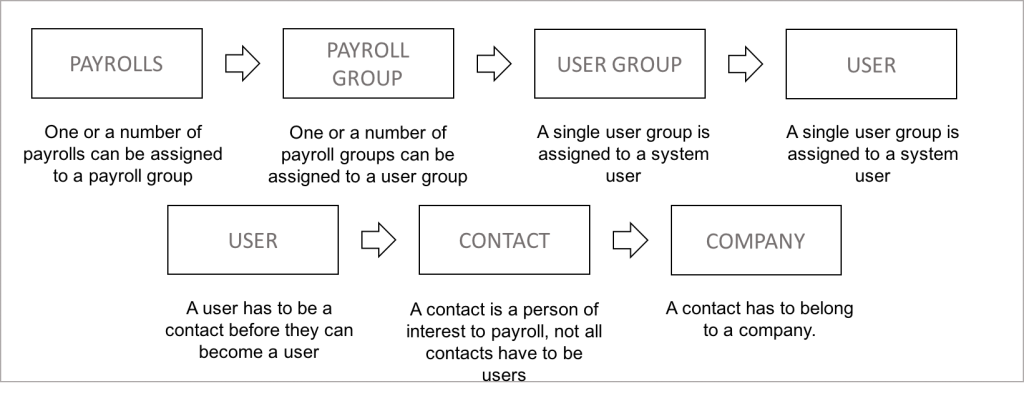
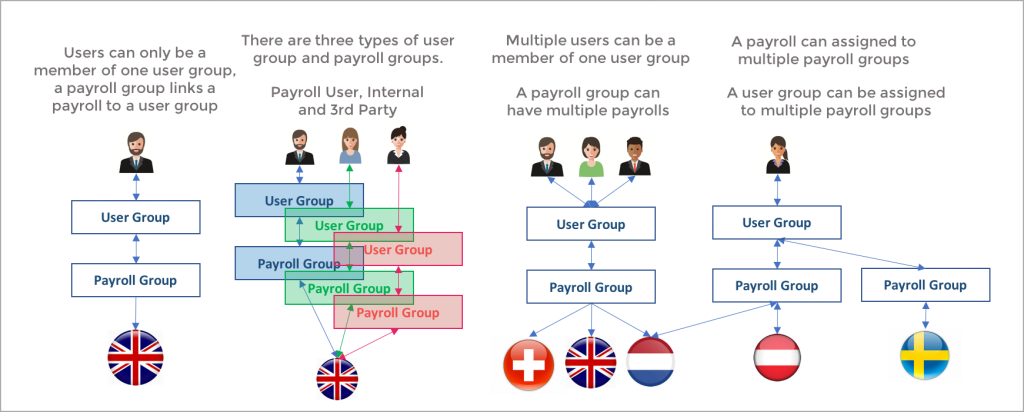
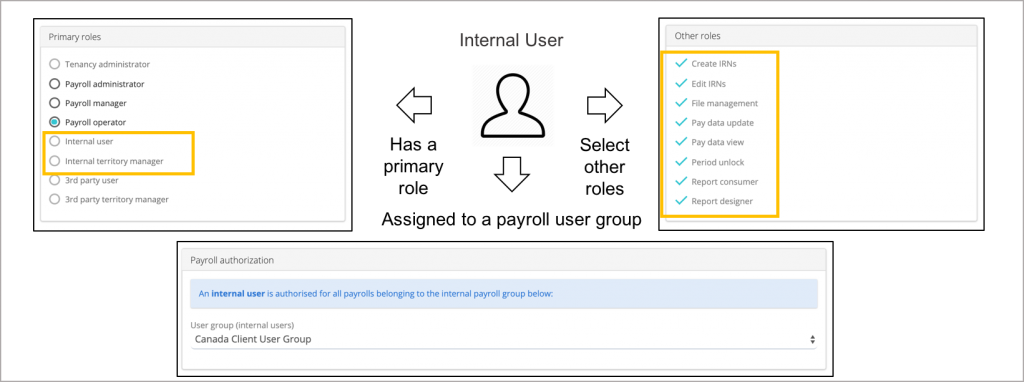
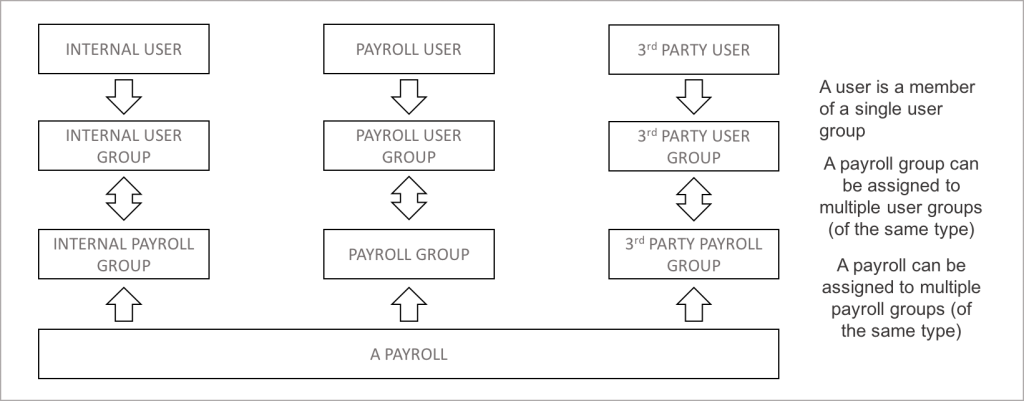
A user can only be a member of one user group. The number of user groups created for a particular client tenancy will be determined by the organisation structure and how information is shared between users. Any number of users groups can be created, and they are segregated by user type, internal, payroll and 3rdparty. Internal and 3rdparty user types and user roles have the same structure.
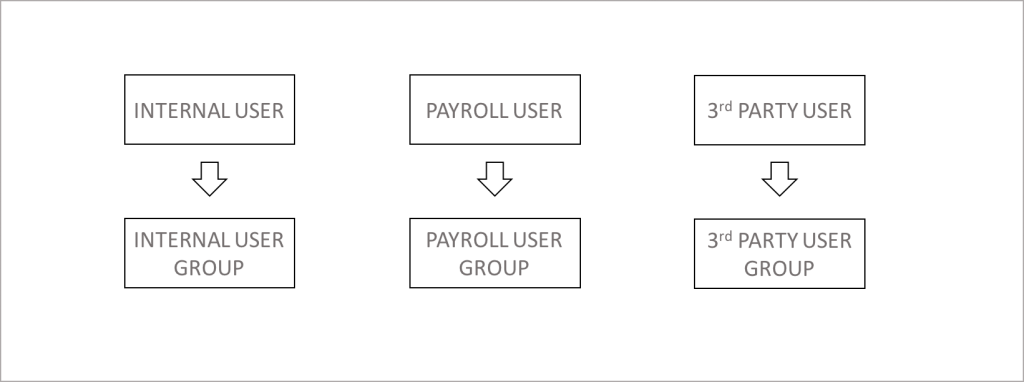
User Groups and Payroll Groups
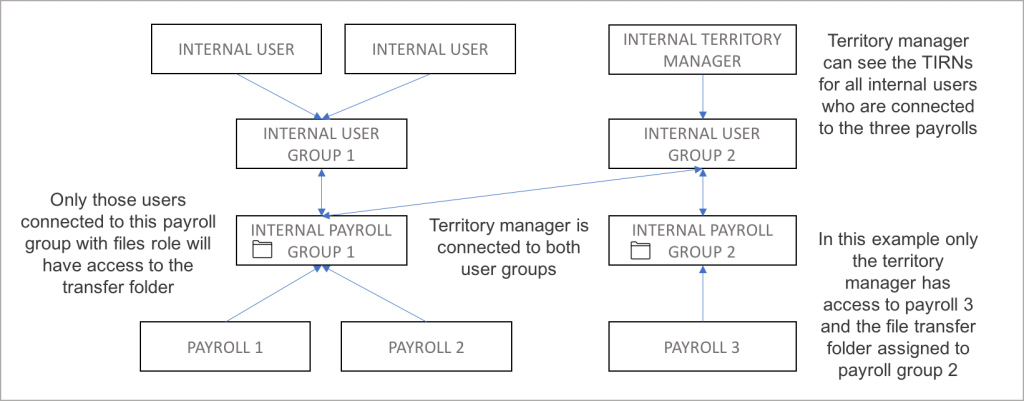
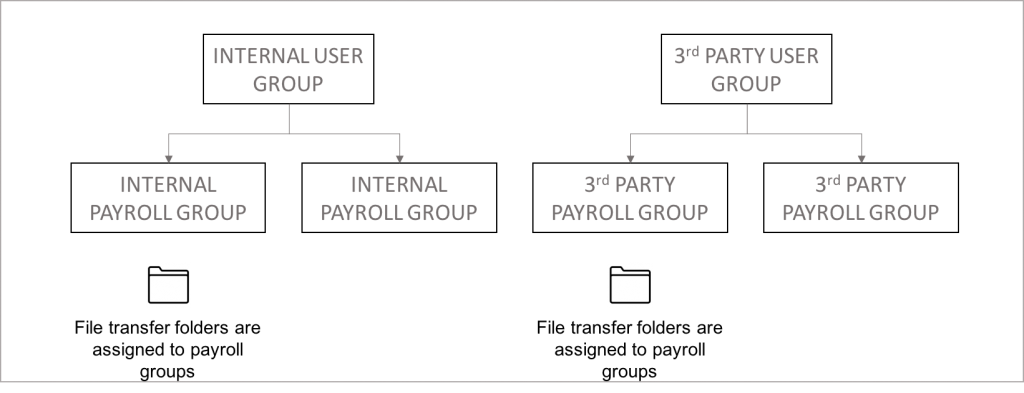
A user group can be assigned to one or a number of payroll groups. The structure chosen for a client tenancy will be influenced by the following rules. Internal users can only see the tasks, issues, reminders and notes of other internal users in their user group, unless they have been configured as an internal territory manager. The same applies to 3rdparty users, File transfer folders are assigned to payroll groups, for a user to have access to a particular transfer folder assigned to a payroll group, their user group has to be connected to that payroll group
Payroll Groups and payrolls
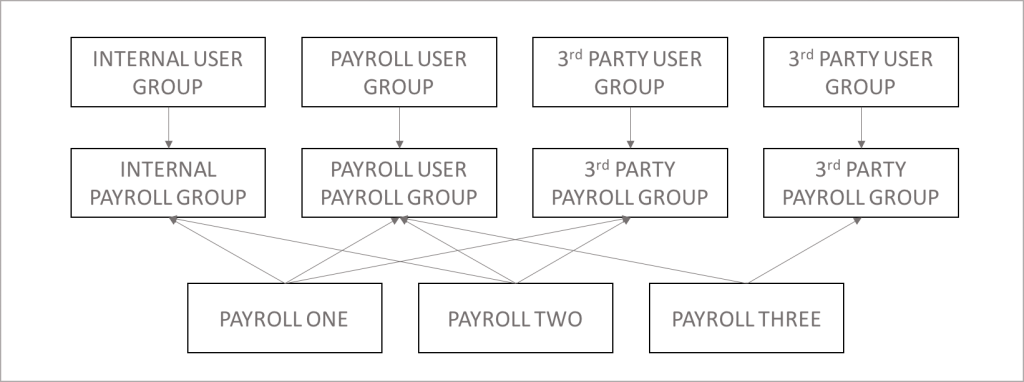
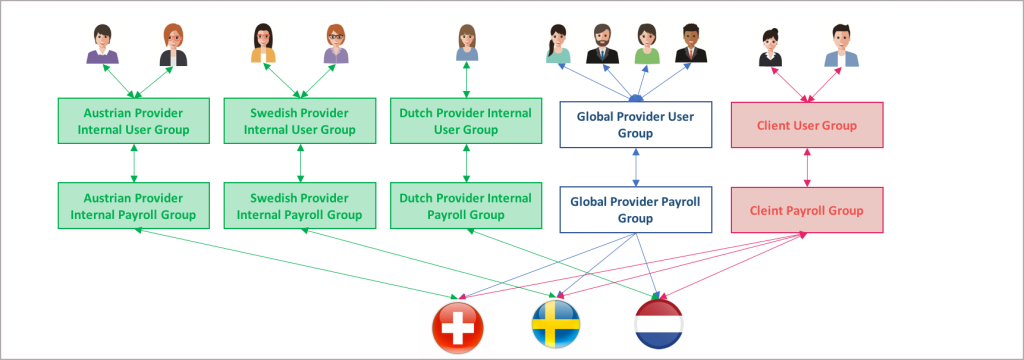
A payroll can be assigned to any number of payroll groups. The system provides a one to many relationship between user group and payroll group and a one to many between payroll group and payroll. As a result a user could have multiple paths to a payroll, so it is import to map the entire organisation. The path from user to payroll will impact their visibility to other users tasks, issues, reminders and notes, and their access to any file transfer folders.
Users groups and payroll groups
User groups and payroll groups are structured to allow and restrict access to functions and payrolls, the file management is controlled by payroll groups and tasks, issue, reminders and notes are controlled by user groups. It is important to map all of the users, companies and payrolls before structuring the payroll and user groups
Organisation and team structure
User types and user groups provides a framework to segregate organisations and teams within an organisation. The payroll users typically belong to the organisation driving and owning the global payroll process, this could be the global payroll provider or the client. 3rdparty users and internal users operate in the same way, and used to segregate the those organisations outside of the payroll users. Payroll users see and control everything, internal and 3rdparty users are restricted to their tasks and functions. The following is an example.
Companies, contacts and users
A companies, contacts and user groups have be created before a user can be created.

- Each contact has to belong to a company. Any number of contacts can be stored in a client tenancy. To become a system user the person has to be a contact first. The minimum information needed to become a contact is first name, surname, email address and their assigned company.
- A company is an organisation or business entity. The minimum requirement is to record a companies name, so that organisation can be associated with a contact.
- A contact can be made a system user, this can be performed from the contact or from the system user screen.
- There are three types of users, internal, payroll and 3rdparty users. This are used to group organisations, for example an end client operation is assigned to an internal user groups, a global payroll operation assigned to the payroll user type and the local country payroll processing team assigned to 3rdparty users types.
- A user is given a primary role and other roles, and assigned to a user group. A user can only be a member of one user group.
Payroll users and roles
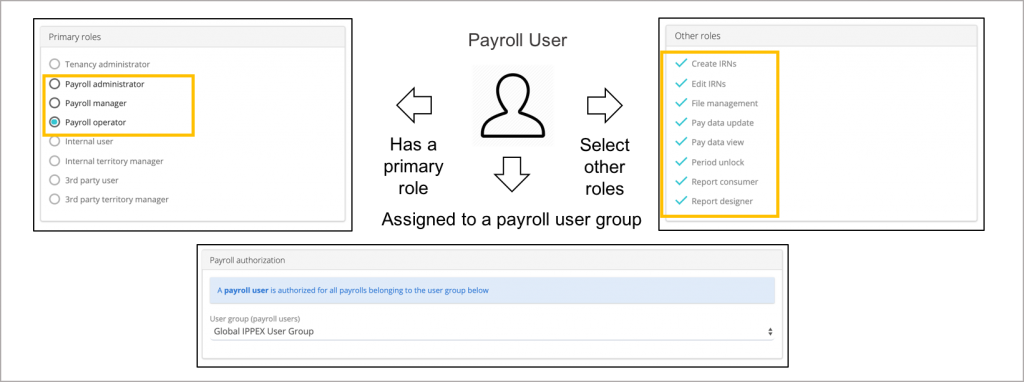
A payroll user can be set-up with one of three primary roles. Payroll administrator, payroll manager and payroll operator. Each role has a set of privileges, payroll administrator having the most. Each user is then assigned other roles, these grant access to specific functions within the system. The user group and the assigned payroll groups and payrolls limits the payrolls to which they have access.
Internal users and roles
Third party users and roles
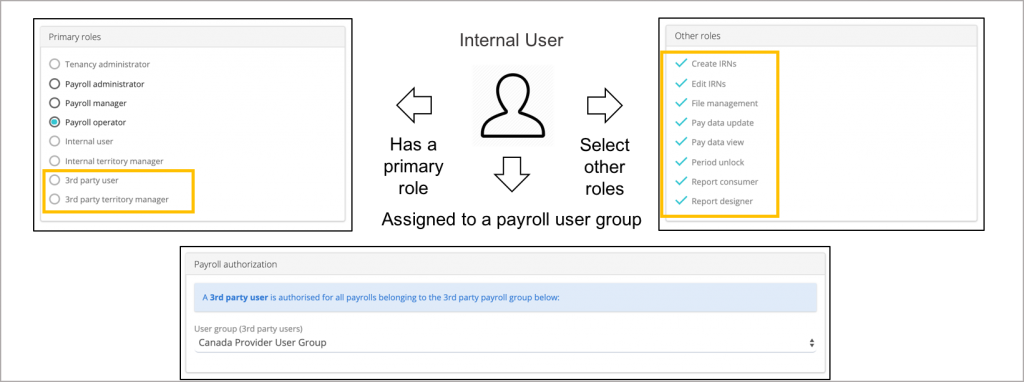
A 3rdpart user can be set-up with one of two roles. 3rdparty user or a 3rdparty territory manager. A 3rdparty user can see and action any of their tasks, issues, reminders and notes and those of users within their 3rdparty user group. An 3rdparty territory manager can see and action the tasks, issues, reminders and notes of any 3rdparty user who has access to the payrolls connected to the territory manager. The user group and the assigned payroll groups and payrolls limits the payrolls to which the territory manager has access.
Users, User Groups, Payroll Groups and Payrolls
To establish the right user group and payroll group structure for a client tenancy will depend on the organisation structure of the client and providers, their roles and data access limitations. IPPEX Global will work with your organisation to advise on the most appropriate structure. With the ability to connect payrolls to multiple payroll groups, and payroll groups to multiple user groups. The hierarchy can support the majority of organisations.
Territory Manager
Internal and 3rdparty organisations has a territory user type. An internal user or 3rdparty user is restricted to seeing and actioning tasks, issues, reminders and notes of users who are a member of their user group. The Territory Manager’s can see and action tasks of other internal users based on the payrolls they have access to.