GL Journal Components
There are five components that are required to generate a GL Journal report.
GL Code Sets: A code set is a list of general ledger codes used in a GL Journal report. IPPEX Cloud will allow for multiple code sets to be stored for each client tenancy.
Pay Element GL Code Configuration: For each payroll, a GL Code Configuration can be created which binds pay elements to the GL codes within a specific code set.
Organisation Units: IPPEX Cloud supports up to five organisational unit structures, employees will have organisational unit values assigned to them at a payroll level.
GL Journal Report Configuration: This defines the report structure for a given payroll, selecting the pay element GL Code Configuration.
GL Journal Report Submission:Under reporting for a given payroll is a kick off page for generating a GL journal for a pay period.
GL Journal Component Relationship
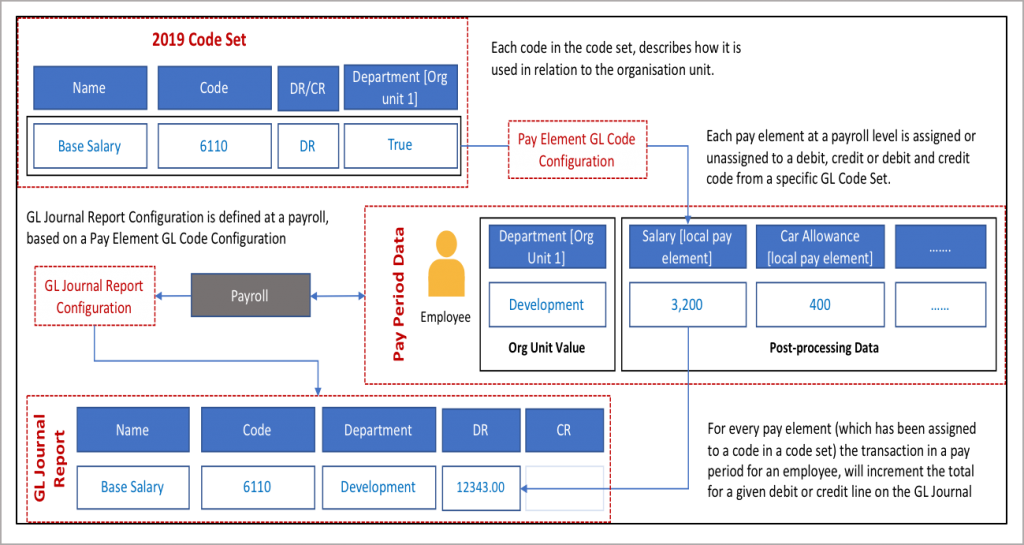
The diagram provides the relationship between the GL Journal code set, the pay element GL code configuration and GL Journal report configuration.
Creating and maintaining GL Code Sets
An organisation may have one or more GL code sets, supporting organisations with different accounting systems or to allow for an organisation to migrate to a new coding system. Code sets are defined at the client tenancy level enabling them to be consumed by payrolls to deliver the GL Journals. Before a code set can be completed it is advisable to create the organisation units for the client tenancy. From the Administration menu click on GL Code Sets.

- Each GL code set is given a name
- A code set can be set as active or inactive, a code set cannot be deleted as it may have been used with a particular payroll
- To edit the a code set click on the action button
- Click on + New GL code set to create a new code set for the tenancy
Code Set Details
There are two pages to a code set, details and codes. When creating a new code set, add the name of the code set and a description if required and then move onto the codes tab. All code sets can be edited and can be made inactive.
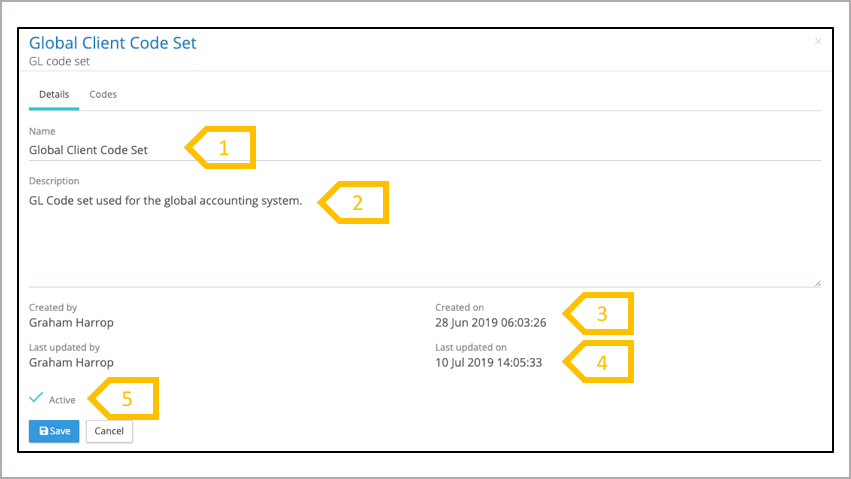
- Name of the code set
- Code set description
- Who created the code set and when
- Who last edited the code set and when
- Status of the code set, if a code set is set to inactive, all the pay element code configurations used against this code set will be set to inactive.
GL Code Set – Codes
The system combines the code and the code name to be a unique code. This allows for a code to be used multiple times with different descriptions, all of which have to be unique. A code does not need multiple names or any name if not required. For those codes with multiple names, the system will summate the debits and credits by code and name (if present on a given payroll). When creating a new code, enter the name, code, select debit or credit and check the organisation units it is grouped by (if any).
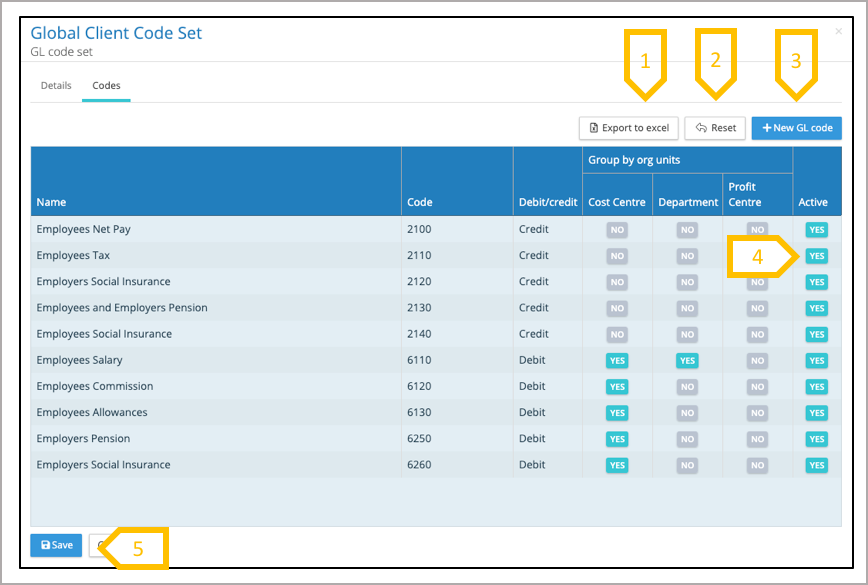
- Export code set to Excel
- Reset all changes since last save
- Add a new GL code to the code set.
- Make a code inactive
- When all of the changes have been made click on Save