Debit bank accounts
Debit bank accounts are used in payment files in two key areas, defining the initiating party and defining the debtors bank account. NOTE: Employee bank accounts (creditors) are held against employees. System users requiring access to bank accounts must have view bank accounts or edit bank accounts privilege.

- Click to edit the bank account.
- Each bank account is given a name which gives it more context.
- A bank account can be set to be inactive.
- Click to add a new debit bank account
Debit bank accounts – create a new bank account
There are two tabs, details describing the bank account and what it is used for and the second tab contains the bank account information.
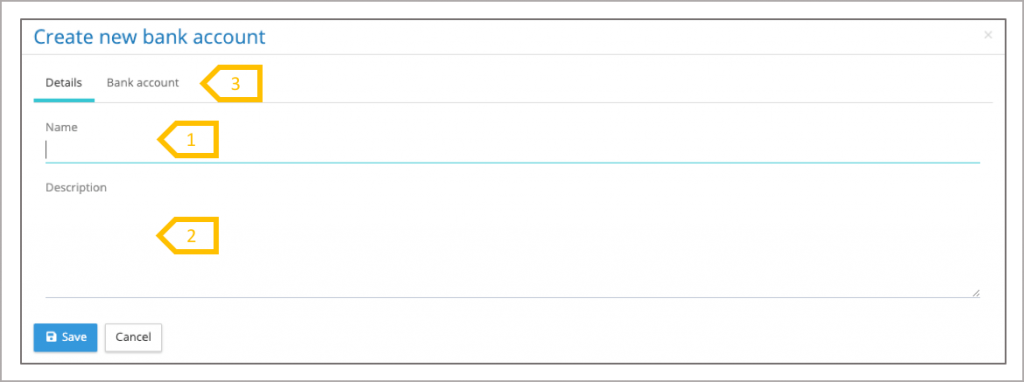
- Add a name for the bank account which describes what it is used for.
- Add a description detailing the type of account and which payments it is to be used for.
- Click on the bank account tab to enter the details
Bank Account Information
The bank account tab includes a bank identification reference, this is used in the payment file where a customer reference identification is needed to verify or link the initiating party or debtor to the bank. Currency is required when making global payments. Address is optional, however most payment systems will require part or all of the address for the bank.
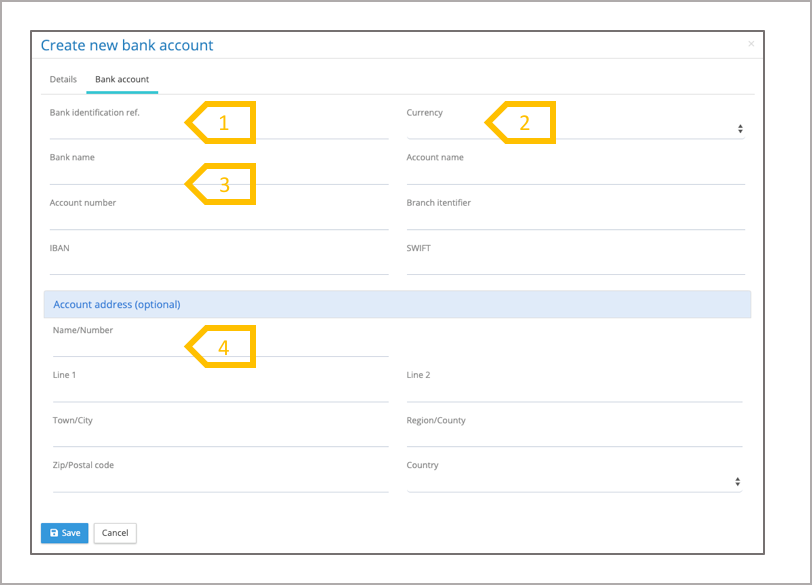
- Enter Bank Identification Reference if this is needed by the bank to link the initiating party or debtor.
- Select currency (mandatory).
- Complete remaining bank fields, bank name, account number and account name are mandatory. Note most banking systems require the IBAN and BIC for the account.
- Complete address, Bank name, Line 1, town/city and country are mandatory.