Company Upload
When setting up a new tenancy or adding new payrolls to an existing tenancy companies have to be added for the client and local providers. We recommend creating a master list of the local country partner company names to populate a new tenancy, on upload you can decide which ones to be added by selecting those companies required for that tenancy.
The template company export and upload facility enables a tenancy administrator to edit or add companies to an existing tenancy, or to upload companies to a new tenancy.
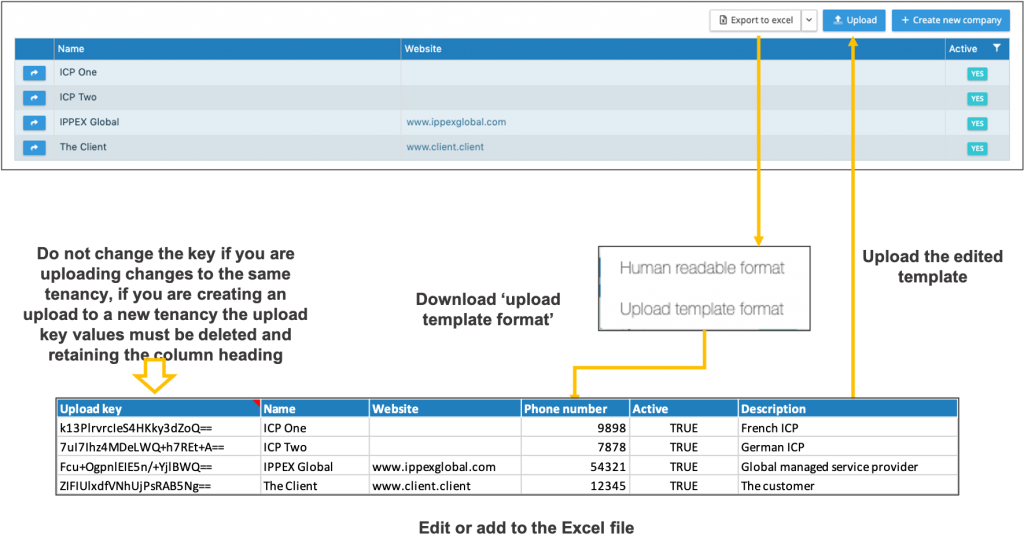
The process is as follows:
- Click on companies
- Expand the Export to Excel button
- Select upload template format, this will download a template, if you already have a number of companies set-up these will be included in the download file.
- The Excel download has a fixed number of columns and headings which are used by the system to upload the company name, website, phone number and description.
- For all existing companies in the list, there is a reference key, do not change this value as this is used by the system to match the line item in the Excel file to the company entry.
- Company name, website, phone number and description can be edited for the existing companies in the list. Inactive companies can also be set to active.
- New line items can be added to the template for these they will have a blank reference key, enabling the system recognises that they are to be added. Each new company must have the word TRUE entered into the active column.
- Click on the upload button and select the completed template, the system will list those items that have changes, and new line items with the option to select all or to select specific line items to be added.
- If the name of an existing company has been changed, all those contacts connected to that company will now show the new name.
- When uploading the companies to a new tenancy please ensure any reference keys have been removed, the column heading has to remain in the upload file.