System User Upload Template
The system upload enables the bulk creation of system user accounts ready for the sending of user activation codes. The following explains the components required for creating a system user:
- A system user must contain an email address of a contact
- A username has to be entered, typically this is the email address of the contact
- A primary role must be given, a note on the primary role heading lists the permissible role types
- A user group has to be entered, this must match one of the user groups on the tenancy and must align with the user group type (Payroll user group, internal user group and third-party user group)
- Under the active column the TRUE must be entered
- For of the other roles e.g. bank account manager, bank account user, file manager etc. a value of TRUE or FALSE has to be entered.
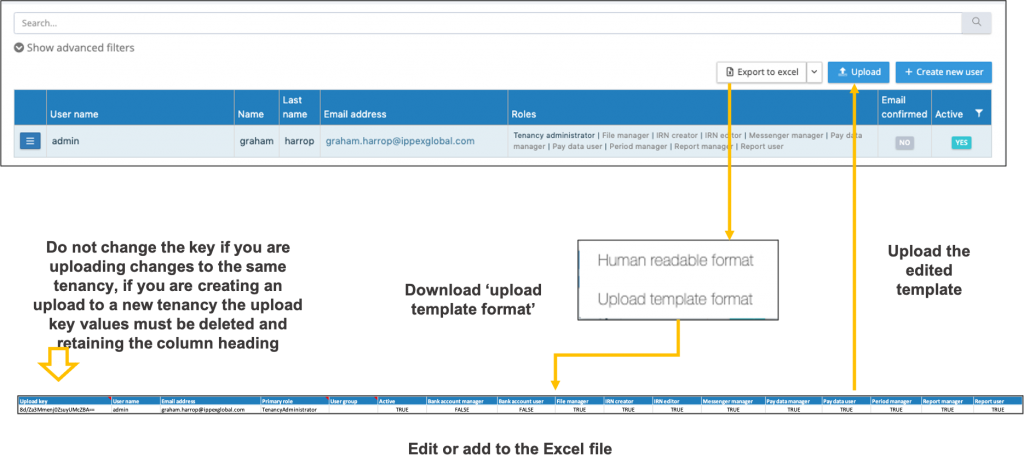
The process is as follows:
- Click on system users
- Expand the Export to Excel button
- Select upload template format, this will download a template, all existing users will be included in the download file.
- The Excel download has a fixed number of columns and headings which are used by the system to upload the title.
- For all existing users in the list, there is a reference key, do not change this value as this is used by the system to match the line item in the Excel file to the contact entry.
- Amend or add users to the template.
- Click on the upload button and select the completed template, the system will list those users that have changes, and new users with the option to select all or to select specific users to be added.
- When uploading the users to a new tenancy please ensure any reference keys have been removed, the column heading has to remain in the upload file.
- The system will create the user accounts but does not send the activation email.