IPPEX Cloud V 1.12 Release Notes


Introduction
Version 1.12 provides the basis for the creation of international SEPA and global disbursement payment files as well as enhancing the pre-processing data for the local payroll provider. There are a large number of new employee features and data types for storing and maintaining personal information, tax references, bank accounts, addresses, annual salary and bank payment attributes. These new functions have resulted in extending the existing configurable reports and upload functionality. Please read carefully the release notes below to understand how you can benefit from these new capabilities such as bank accounts and how the system has changed in the areas of employees, reporting, upload and companies.
Our goal has been to provide an environment to store all of the key attributes associated with making international payments without the need to maintain beneficiary templates or client accounts in a given banking or payment system. IPPEX will be building build a configuration tool for the creation of XML payment files, this will include the facility to pay employees via beneficiary templates.
IPPEX payment system has been designed to support a variety of options that arise in global payroll and expat environments, such as supporting multiple currencies in a single payroll, split pay, fixed exchange rates, charge bearing assignment and instructed amount / equivalent amount set at an employee level.
A new element type has been created called payments, and in Version 1.12 we are supporting two payment elements; net pay and expenses.
The main menu now has two new items; the addition of Debit Bank Accounts and Companies which has been moved from sub menu item under administration. Internal and 3rd party users will now be able to view companies but only see their company details i.e. the one associated with their contact details.
Three new permissions have been created for system users relating to payments. This is to enable the segregation of duties to limit the risk of fraud, separating the editing of bank accounts with the creation and running of payment files. The third permission is for viewing banking information, this can be given to specific users who are managing queries from employees and may need to validate an account is correct.
The system now supports effective dates for bank details, addresses, civil status and salary, these have two purposes information to support the payment file and to improve the pre-processing data for the local payroll provider.
The employee portal has been extended to enable employees to view their address and bank details held in the system, and to provide updates to the payroll administration teams of address and bank account changes. These updates are captured in the employee query system, and actioned by query group administrator who has bank update permissions, accepting or rejecting the updates to the employee record.
We have introduced a BETA version of our new system user help facility; a user name and password is required to access all of the detailed user guidance for any aspect of the IPPEX system.
There have been a number of changes to email messages, with a new facility to provide notifications to employees when Show new PDFs is enabled, with a feature to add a specific message to the employees. For pre-processing, post processing and PDF document uploads, the system generated email messages provides more detail on the upload, listing the number of successful rows/PDFs, failed rows/PDFs or ignored PDFs, which will save time having to view the results file for every upload.
With the introduction of date effective employee fields, all of the reports have been updated to cater for the new information, plus a change to the way the system locks the pre and post-processing data. All of the reports now include a results sheet, providing details on who created the report, when it was created, the pay period and the locking status. All of the new employee attributes can be edited on-screen, the system will inform the user in which pay period those edits will take effect in the changes report based on the status of the locked periods.
For supplementary periods e.g. Off Cycle, there is now an option to carry across the standard period’s persistent values to the supplementary period.
With
so many new features and enhancements to the system, please ensure you and your
colleagues arrange a training session with IPPEX to cover all of the
capabilities.
Employee Data Enhancements
Introduction
To enable the delivery of global payments and to enhance the changes data needed to feed the payroll processing by the local payroll provider, a significant number of new employee attributes have been added to the employee. These new fields will replace some of the information that may have been captured in employee details. All of the values for the new employee attributes can be entered directly into the application or uploaded using the new employee upload mechanism. The all data, changes and variance reports have been extended to include these new attributes.
Extended Employee Action List
Extended list of functions offered from the action button against an employee:
- View and edit the employee record
- View pre-processing payments for this employee
- View post processing payments for this employee
- View payments for this employee
- View employee details for this employee
- View organisation unit values for this employee
- View and update the employees addresses
- View and update employee’s bank details
- View and edit the employee’s annual salary
- Create an employee user account for the employee
- Go directly to the employee’s folder in files to view their documents.
Create New Employee
There is a new layout for viewing an employee and creating new employee, adding a set of new expandable fields for identification data, banking configuration and PDF Document Keys. To create a new employee the email address and start date is now non-mandatory. The following lists the employee fields:
- Employee record
- Employee number (mandatory)
- First name (mandatory)
- Last name (mandatory)
- Email Address
- Phone Number
- Start Date
- Leave Date
- Last Pay Period
- Identification data
- Gender
- Date of Birth
- City of Birth
- Country of Birth
- Additional Identification data
- Nationality
- Tax ID
- Social Insurance ID
- Other ID
- Passport number
- Passport country
- Passport Issuer
- Payment Configuration
- Split payments (yes/no)
- If yes – Fixed or percentage and value
- Has beneficiary ID yes/no
- If yes – Beneficiary ID
- Payment currency override
- Instructed amount/equivalent amount
- Charges to employer or charges borne by employee
- Has guaranteed rate
- If yes – Exchange rate contract, guaranteed rate and guaranteed rate end date
- If yes – rate type agreed, rate type sale or rate type spot
- Split payments (yes/no)
- Document Keys
- 1 to 10 PDF Document key values
NOTES:
- Employee Payment configuration is used for non-standard payments, the default settings are unchecked split payments, no beneficiary ID, no payment currency override, instructed amount, charges to employer and no guaranteed rate.
- if an employee has split payments the system provides fields for secondary bank account and secondary address, these have to be manually updated.
- The new release is an extension of the employee information, therefore all existing data from current employee data will remain unchanged.
Employee Payments
A new set of elements have been created specifically for payments, these hold the paid amounts for a payment file. We have two payment element types Net Pay (the paid salary amount) and Expenses. Using the post-processing upload, specific values are mapped to the payment elements.
Where the net pay listed a gross to net report is also the employees payment amount, the value can be uploaded to the payments – net pay element, or uploaded twice, against the net pay post processing pay element and to payments – net pay element.
The All data report can be used to create a CSV upload file for you banking system including the payment amount and any other supporting information such as employees bank account or beneficiary ID. In a future release the payment value will be used in SEPA and global disbursement XML payment files.
New date effective employee information Addresses, Annual Salary and Civil Status
There three new employee data types which utilises effective dates. The data fields associated with these areas can be updated directly into the application or through the employee upload system. Alterations have been made to the pre-processing locking process ensuring that all new updates to address, civil status and annual salary are captured in the changes report. It is important to read the user guidance regarding how pre and post processing locking has changed. The changes report has been enhanced to be a multi-tab report separating out the date effective information.
Using the new employee menu, there are new screens to view and edit address, salary and civil status. The employee can also provide an address update (which is handled through the employee query system) and if accepted by the query administrator it will go directly into the employee’s record.
NOTES:
If an employee has been set-up for split payments, a secondary address table becomes available, the address details have to be entered via the system, and does not form part of the employee address upload system.
NOTE: when entering addresses the country should be entered as the 3-digit ISO County Code e.g. United Kingdom = GBR
Employee Bank Accounts
There is new section for employee bank accounts, each bank account has an effective date and the system will store and list the bank account history for an employee. A bank account has following fields:
- Bank Effective date (mandatory)
- Bank Name (mandatory)
- Account Name (mandatory)
- Account Number (mandatory)
- Branch identifier
- IBAN
- SWIFT
- Address (Optional)
- Name/number
- Line 1 (mandatory)
- Line 2
- Town/City (mandatory)
- Region/County
- Zip/Postal code
- Country (mandatory)
It is not mandatory to use the bank account address but if used there are three mandatory fields.
All of the reports have been updated to select the employee bank fields, the reports will include the most recent effective date bank account up to and including the date of pay day for a given pay period. If an employee’s bank details are incorrect it can be edited on screen or if a bank account change is applied via the employee bank account upload with the same effective date of an existing bank account record the system will treat this as an update.
There are three new system user permissions, designed to create a segregation of duties relating to creating and managing bank accounts and creating payment files.
- Bank account view – Allows a system user to view employee bank account details
- Bank account update – Allows a system user to view, edit and upload employee bank account details
- Payments – This applies to future XML payment files, this permission is required to configure and run payment files.
The employee can also provide bank account update (which is handled through the employee query system) and if accepted by the payroll administration staff (who will require bank update permission) it will go directly into the employee’s record.
NOTES:
If an employee has been set-up for split payments, a secondary bank account table becomes available, the bank account details have to be entered via the system, and does not form part of the employee bank account upload system.
Payroll Upload
There have been a number of changes payroll upload to include the new employee attributes and to the way the system handles pre and post processing locking.
Employee upload
Employee upload has been split into three upload types, all of the uploads are synchronous (immediately committed to the database upon clicking upload)
- Employee upload – This continues to manage the creation of new employees as well as the upload of identity data, beneficiary ID, PDF keys, civil status (including effective date) and salary (including effective date).
- Employee address upload – Employee address and effective date
- Employee bank account upload – Employee bank account, bank account address and effective date.
The system will always inform the user performing the upload, which period the data will be reported in. The changes report contains all address, salary and civil status changes that were uploaded or entered into the system between two consecutive locked pre-processing periods. The changes report will only provide those bank details with the most recent effective date preceding the pay date of the ‘to period’.
NOTES:
The system will fail an address, salary and civil status upload for an individual employee if an effective date is not supplied. The effective date can be in the past or the future.
The system will fail a bank account upload for an individual employee if the effective date is in the past, it has to be either the day of upload or in the future.
Payroll changes upload
Payroll changes are designed to collate the pre-processing information for a payroll processing period, this includes pre-processing pay data, employee details and organisation unit values. Employee details can only be updated using the payroll changes upload and organisation units can be uploaded in both payroll changes and gross to net upload.
The upload mechanism operates in the same way as before, it is important to read the section on period locking.
Gross to Net Upload
Gross to Net Upload is designed to capture post processing data from the gross to net report, payment values and organisation unit changes. The upload mechanism operates in the same way as before, it is important to read the section of period locking.
Locking
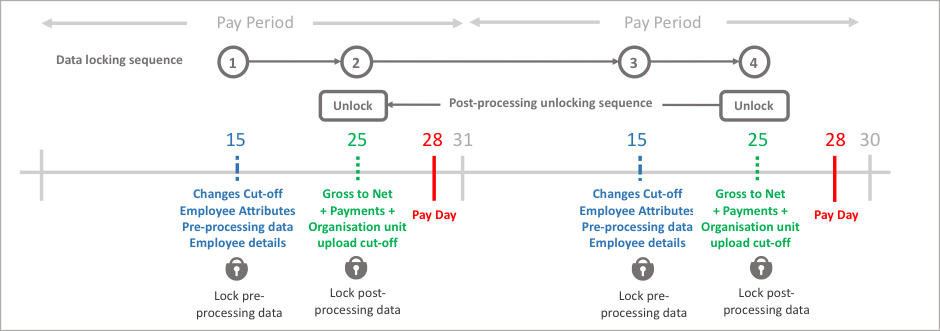
The system enforces the existing rule, that the preceding gross the net data has to be locked before payroll changes can be uploaded to the next period, and the preceding changes data has to be locked before the gross to net data can be uploaded. What has changed is the permanent locking of payroll changes data, when the first upload is performed to the next period’s payroll changes. The unlocking of gross to net (post-processing) data operates independently of the payroll changes data (pre-processing data)
The system enables the uploading of pre and post processing data. This is a sequential process, and to provide controls on the data the system enables users with the data upload permission to lock the data which has been uploaded for each period. Data uploads can be unlocked (see rules for unlocking) to perform further uploads or data input for a given period and data type. Payroll reporting relies on the locking of data for each pay period.
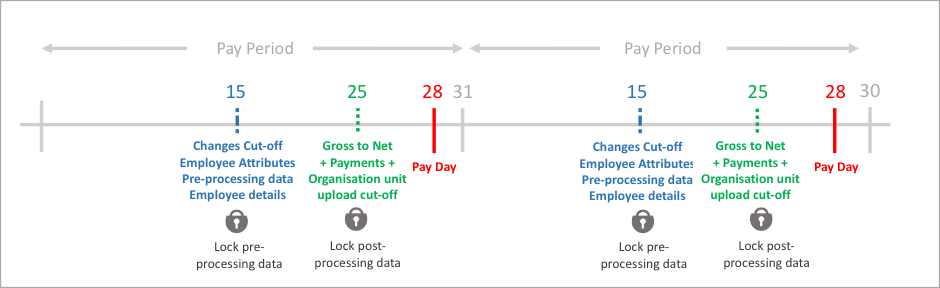
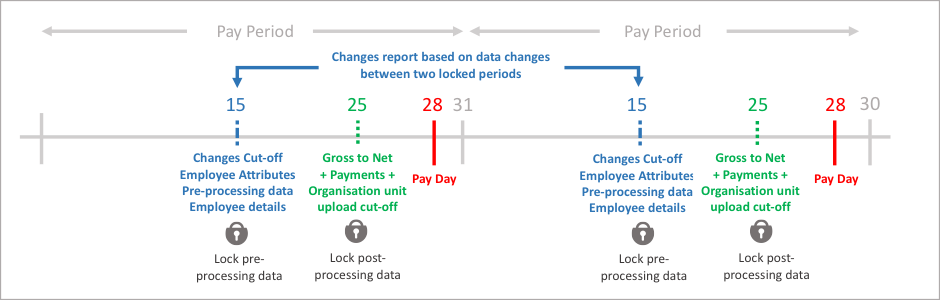
The system will take a snap shot of the employee data when the payroll changes data (pre-processing) is locked, this will be used to compare the values from the current period to the previous period to generate the changes report. The current pay period’s payroll changes data can be unlocked to make further changes and re-locked, the system will take a new snap shot of the current employee data values at the point of re-locking. Any uploads or inputs to date effective information such as salary, civil status and address has a date stamp when the information was added to the system, the changes report will list all data uploaded between the locked pre-processing periods.
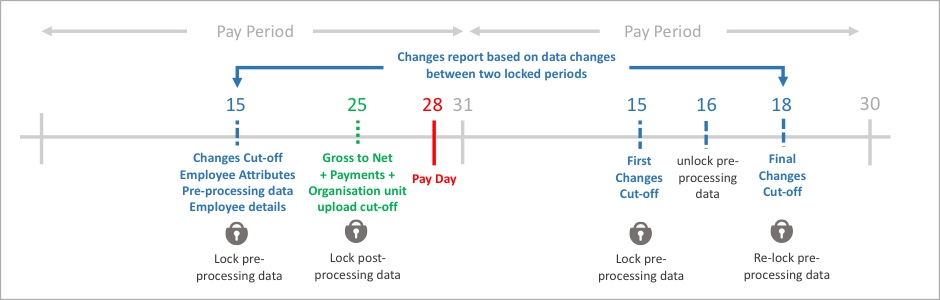
The current pay period’s payroll changes (pre-processing) data can be unlocked to add new data. Data that has been added to the system from the first locking of the changes data and the final locking of the changes data for that period will be included in the changes report.
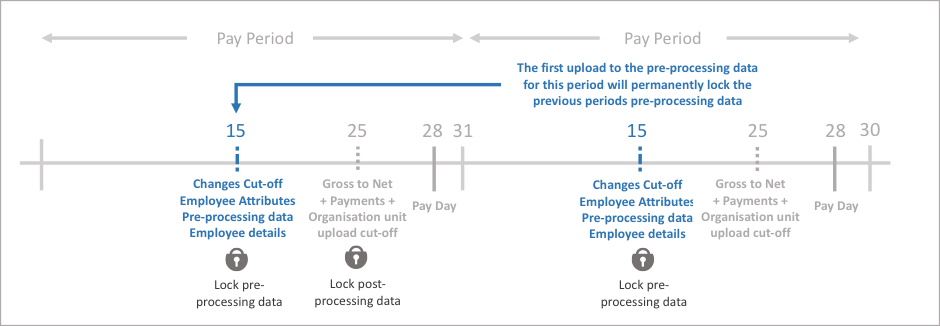
The payroll changes (pre-processing) data for a period can only uploaded provided the preceding period’s post processing data has been locked. When the first upload of payroll changes data is performed for a pay period, it will permanently lock the previous pay period’s payroll changes (pre-processing) data. This ensures all data captured in the current payroll changes upload appears in the changes data reports. In summary, current period’s payroll changes data can be locked, unlocked and re-locked up and until the first upload is performed on the following periods payroll changes data.
To perform uploads to payroll changes (pre-processing) data and gross to net (post-processing) data, the preceding data upload has to be locked. Pre-processing to Post-processing to Pre-processing to Post-processing…….
Gross to Net data (including organisation units and payments) can be unlocked independently from payroll changes data to correct an earlier period’s gross to net data or organisation unit values. Gross to net data unlocks have to be performed sequentially period by period.
Reporting
The most significant change to reporting relates to all the new employee data types added to the system, the following lists the new features for each type of report:
- All data report
- Kick off page has a check box to add totals to pay elements and payment columns, the default option is checked.
- Added CSV to the output format
- Employee attributes, address, salary, civil status, banks accounts and payments have been added to the report configurator
- Ability to add one or any number of empty columns
- A sequential number is placed against the assigned columns in the configurator, this helps to define CSV file column ordering for upload files
- Changes report
- Employee attributes, address, salary, civil status, banks accounts and payments have been added to the report configurator, the changes report includes all address, salary and civil status changes added to the system between the two locked periods. This caters for the situation where an employee could have had two or more salary changes each with different effective dates or two more address changes.
- Ability to add one or any number of empty columns
- Multi-sheet report covering changes, address changes, salary changes and civil status changes.
- Variance Report
- Employee attributes, address, salary, civil status, banks accounts and payments have been added to the report configurator, for all but payments the most recent value will be shown for the ‘to period’, percentage and value variance will be shown on payment elements.
System users who do not have either view employee bank details or update employee bank details can run a report that includes the bank detail headings, however no data will be included within the report.
All reports include a sheet containing the report details, who ran the report, when the report was run, locking status of the payroll, pay period and parameters selected in the report kick off.
Debit Bank Account
Debit bank account is a new section on the main menu, this is for holding the debiting bank account details and reference information for the initiating party for the future XML payment files. Any number of bank accounts can be stored. The XML payment file will have a configuration, which will be linked to a debit bank account.
Companies
The companies section has moved to the main menu. A new facility has been added to store addresses and local company names for each company, these will be used to identify the debtor and ultimate debtor in the payment files. Access to companies has been changed so internal users and 3rd party users will be able to access companies and they will only see the company that their user account has been assigned to.
IPPEX Cloud Help
IPPEX have enhanced the user help, introducing a knowledge base of information on how to use and configure the IPPEX Cloud system, we have introduced a BETA version of user help in this release. Click on the help button and it will take you to a help portal.
Payroll Calendar Changes
The payroll calendar has a number of new features.
- When viewing the payroll calendar for standard pay periods, along the left-hand side of the screen is shows which periods are pre-processing and post processing locked.
- The first pay period date used to set up the payroll calendar is shown at the bottom of the payroll calendar screen.
- When a payroll is in the last pay period of a tax year, pre-processing and post processing data cannot be uploaded until the new tax year calendar has been set-up.
System Administration – System Users
Don’t forget there are three new ‘Other roles’ or permissions, view employee bank accounts, edit employee bank accounts and payments (will be used in a future release)
Employee Update
There are two new menu items on the employee portal, employee address and employee bank account. An employee can view their bank account and address details, and provide updates.
To enable employee update the following items must be in place:
- From the administration settings page enable employee query and employee bank account + address update.
- Ensure a query group has been enabled for the target payrolls by adding query administrators to the list query group list for each payroll.
- For bank account update, one or more of the query administrators will require bank account update privilege.
Via the web portal, employee users will be able view their bank account and addresses for each of the payrolls they are a member of. The can submit a new bank account or address, the submission will be sent to the query user group for managing. The employee will receive an email notification stating that they have made a submission and it is pending approval, and a message appears above their address or bank account table stating there is a pending request.
The submission appears in the employee’s and query group manager’s query list, if an employee has made a mistake with their submission they can cancel the request from the query list.
The query group administrator has three options, to approve, cancel or reject the submission, the employee will receive a further email notification detailing the action taken by the query group administrator and the employee can also view the closed, cancelled or rejected submission in their own query list. If the employee update has been accepted, the change will be committed to the employee’s bank account or address record, and will be visible by any system user with the appropriate permissions or by the employee.
The mobile app offers less functionality, it enables the employee to create a new submission. Over time the mobile app will be extended to offer greater functionality.
NOTES:
Employee update is including as part of the fee structure for employee query. Employee view only of address and bank account is included as part of the base license fee.
Show PDF Document email notification
When PDF documents have been uploaded to a payroll, and the hide new PDF document function has been enabled, the final step in the process is to show new PDF documents. On clicking show new PDF documents brings up a new screen, asking the user if they wish to send an email notification to the employees and an option to add a message to the email.