Notes
Notes enables a user to record an event or sharing best practice with regard to for a payroll. It is simple to do and helps to support the governance process and process improvement for a payroll.
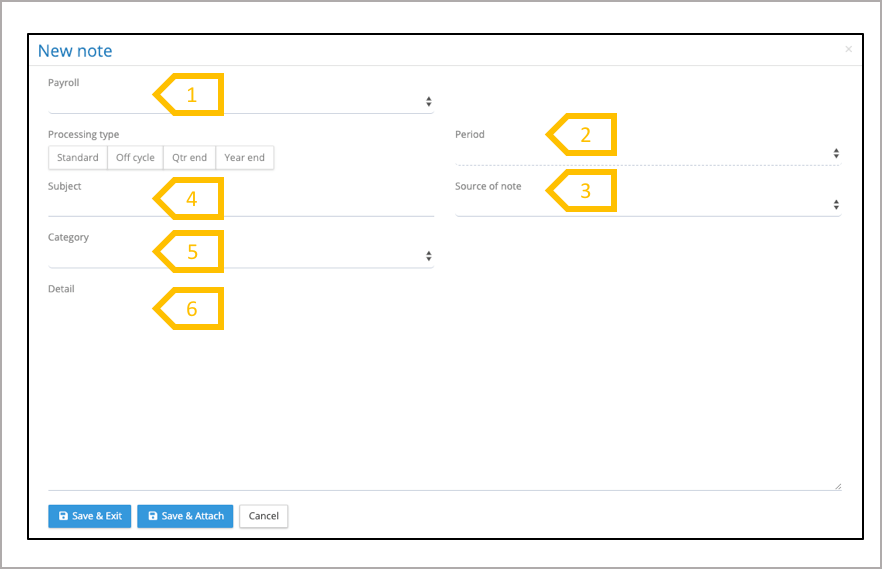
- Select payroll.
- System populates the reminder with the current pay period, adjust if required.
- Select source of note (mandatory).
- Enter subject5.Select category (mandatory).
- Enter details of the note
Notes Navigation
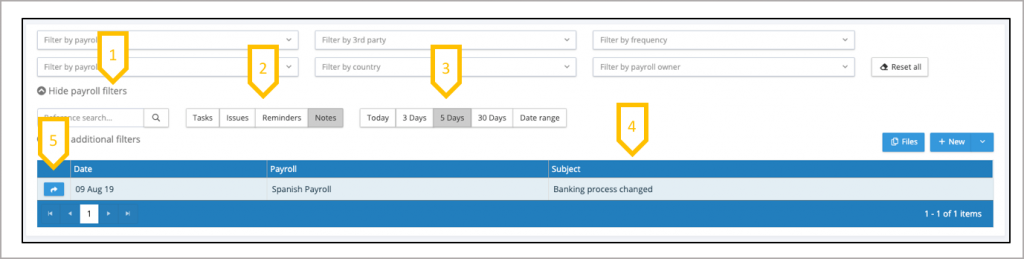
- Use the payroll filters to reduce the list of reminders to a sub-set of payrolls.
- Jump to Tasks, Issues and Reminders (this carries forward any of the payroll filters that have been applied.
- System opens on the previous 5 days, select alternative period or select a date range.
- Click on column heading to sort by that column.
- Open the detail of the reminder