Reminders
Reminders enables a user to record an action or reminder for a future date, this can be set-up for their own use or assigned to another user. Easy to set-up simply select the payroll, the pay period, give the reminder a name and description and set the due date.
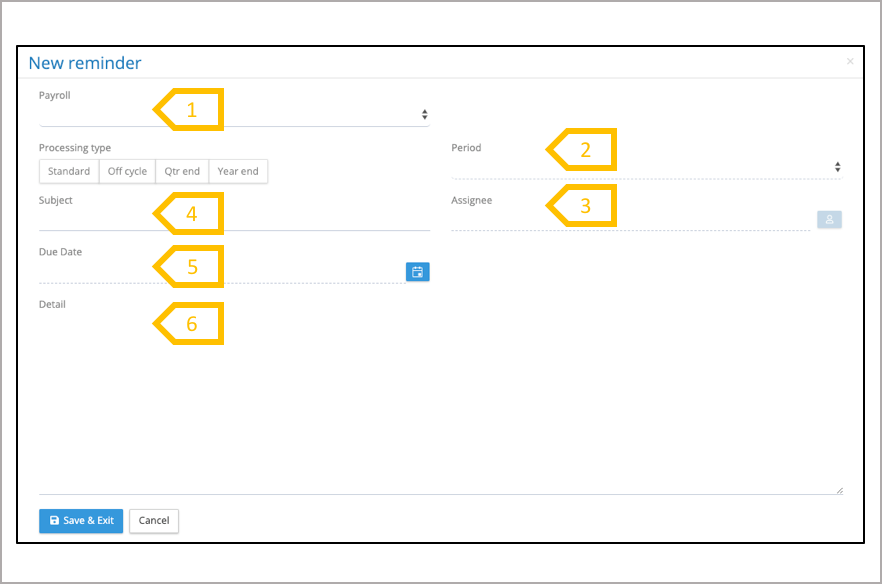
- Select payroll.
- System populates the reminder with the current pay period, adjust if required.
- Select assignee.
- Enter subject.
- Select due date.
- Enter details of the reminder
Reminder Navigation
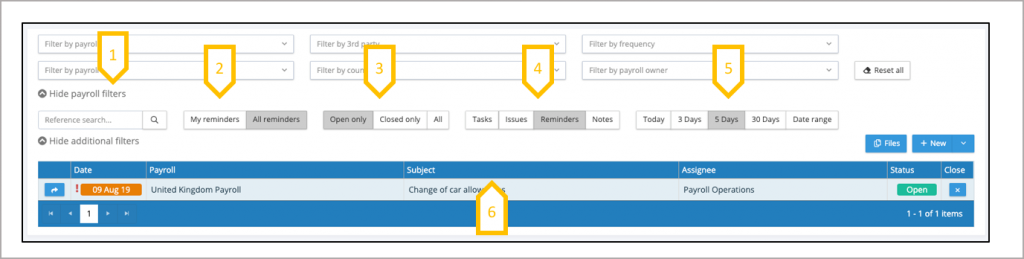
- Use the payroll filters to reduce the list of reminders to a sub-set of payrolls.
- The system always opens on My reminders, click on All issues to see the reminders of other users in your user group (internal and 3rdParty users) or all reminders from all users (payroll users).
- View open reminders, closed reminders or all issues.
- Jump to Tasks, Issues and Notes (this carries forward any of the payroll filters that have been applied.
- System opens on 5 days, select alternative period or select a date range.
- Click on column heading to sort by that column.
- Open the detail of the reminder8.Close the reminder