Contacts
Contacts are used for two purposes to hold contact information on people associated with the client and payrolls being managed, and to create system users. A system user has to be a contact before the user account can be created.
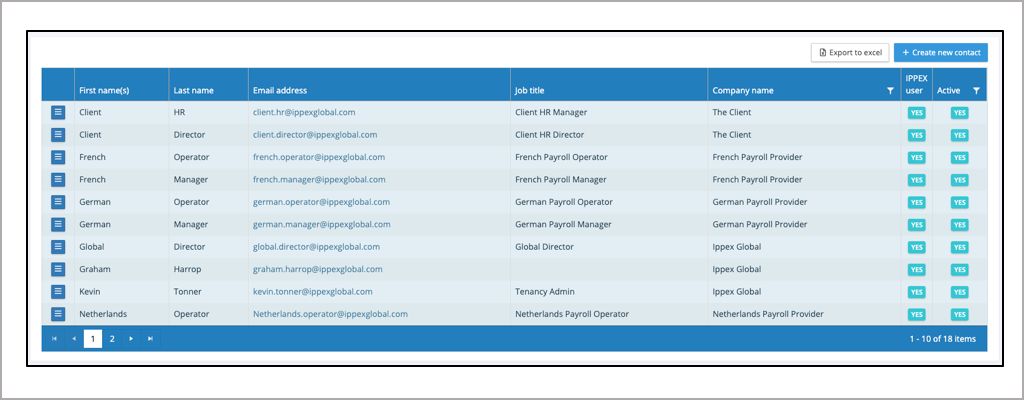
- Click on header row to sort by column.
- Export contacts to Excel.
- Click to create a new contact.
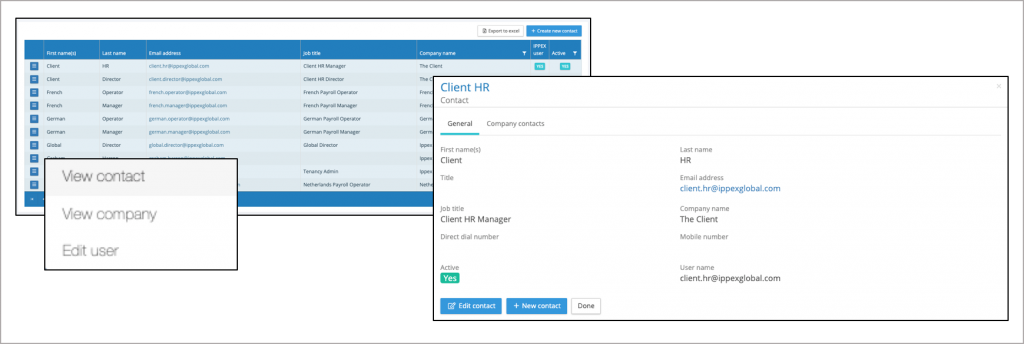
- Action button to view contact, view company or edit user..
- Page through the contacts.
- Shows if the contact is a user.
- Filter on active, non-active or both
Creating a new contact
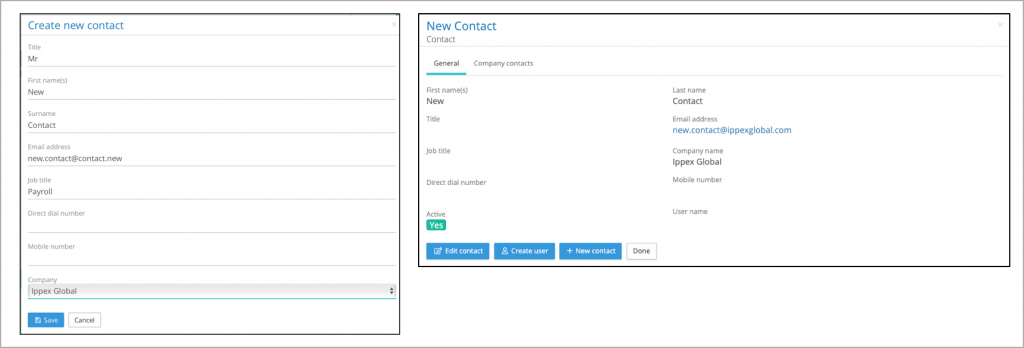
When creating a new contact first name, surname and email address is mandatory. The email has to be unique and cannot be used by another contact in the system. A contact has to be assigned to a company, ensure the company has been added to the system. When the new contact has been saved the contact view changes, presenting four options, edit the contact, create a user from this contact, create a new contact or exit the contact (Done)
Editing a contact
From the action button against a contact, there a three options view the contact, view the company that a contact is assigned to or edit the user account if that contact is a system user. By viewing the contact, the contact details can be edited. A contact can be set to in-active, this will also set their user account to be inactive.