Pay Element Group Configurations
Pay element groupings provide a common pay element description which enables global reporting across multiple payrolls. Pay element groups have to be set-up for a client tenancy before they can be assigned to a pay element. The system supports two levels of reporting, pay element group and sub-group, in addition each pay element is given payment type, e.g. employer to employee.
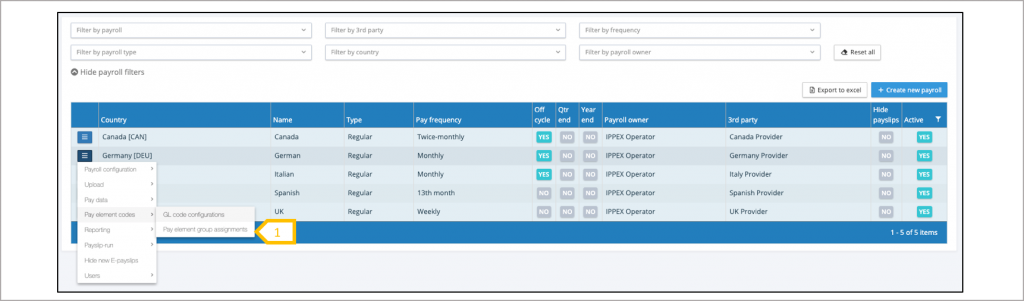
- The payroll action menu select pay element codes > Pay element group configurations
Pay element group assignment
The system lists all of the post-processing pay elements for the payroll, by assigning a pay element sub-group to a pay element, this automatically assigns the pay element group and payment type. When using the multi-period and multi-payroll transaction report, each employee transaction will include the pay element grouping.
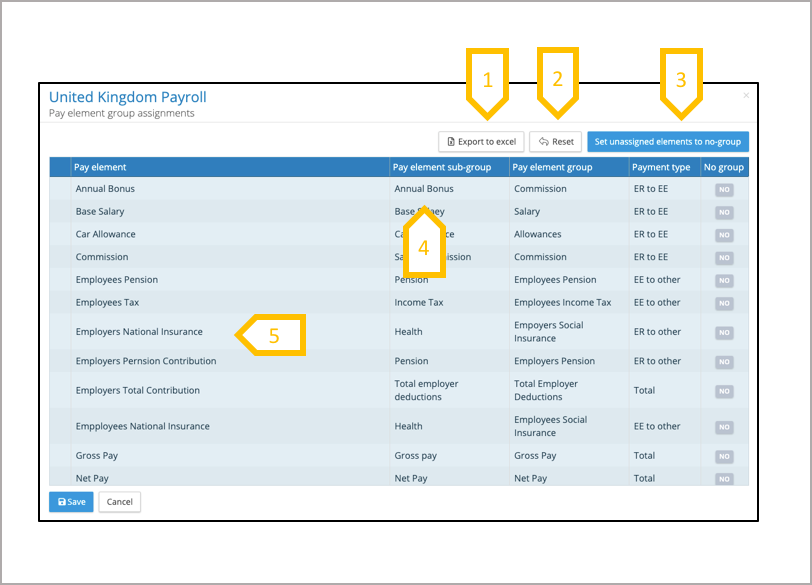
- Export pay element group table to Excel.
- Reset the changes made to the last save.
- Set all remaining un-group pay elements to no grouping.
- Click on drop down sub-group list to select the one for that pay element.
- All pay elements require an assignment or no grouping, so when a new pay element is produced for a payroll it will appear in red, showing it needs to be assigned to a pay element group.