IPPEX Cloud V 3.08.0 Release Notes

Introduction
Version 3.8.0 adds various enhancements to IPPEX Cloud including:
- The addition of Danish and Italian as accepted languages
- Refreshed language support on all current language options
- New role permissions to the Service Delivery Manager primary role
- New Tool Tips for PDF Document Runs
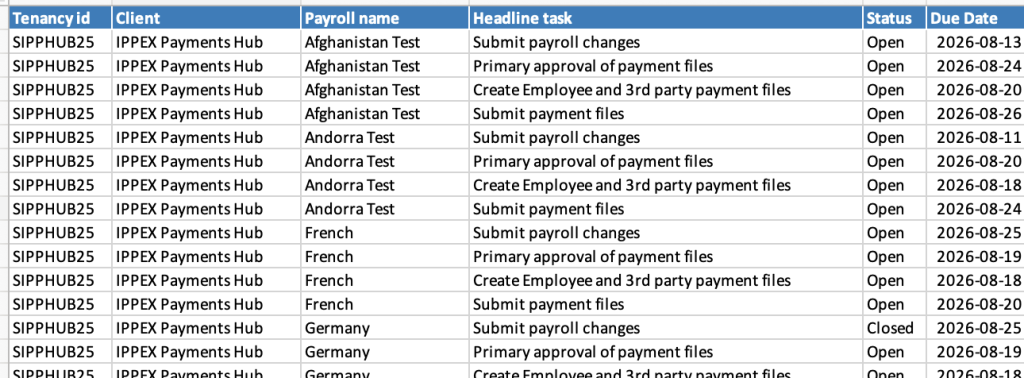
- Additional Columns on dashboard excel export
Language Updates
With the addition of Danish and Italian, this brings the number of supported language on IPPEX Cloud to 13 languages including:
- English
- Danish
- German
- Spanish
- French
- Italian
- Hungarian
- Norwegian
- Polish
- Romanian
- Swedish
- Bulgarian
- Mandarin Chinese
All current language offerings have also gone through an update providing an enhanced user experience across all supported languages. Supported languages will continue to expand as more languages will be added in further releases.
New Service Delivery Manager Roles
The Service Delivery Manager primary role has had additional role permissions granted to it, increasing the scope of what an SDM can accomplish in IPPEX Cloud.
The new role permissions include:
- Uploading files from workspaces and file structure
- Deleting files from workspaces and file structure
- Closing tasks regardless of whether the task is assigned to them
- Re-opening tasks regardless of whether the task is assigned to them
- Accessing the Workspaces, SFTP, and Upload Identifiers options from the Administration menu icon
New Tooltips on PDF Document Run
Following our rollout of the new PDF Document Run User Interface, we have added additional tooltips to assist system users with the correct procedures to follow.
The ? Icon next to the Schedule release button now displays the following tooltip:
“If ‘Scheduled Release’ not selected –
Processed documents will be available to employees immediately
If ‘Scheduled Release’ selected but no Release Date –
Newly processed documents will be hidden from employees and must be released manually
If ‘Scheduled Release’ selected and a Release Date is entered –
Documents will become visible to employees on the specified Release Date (or can be manually released at any time beforehand)”
Additional Columns on Dashboard Excel Export
When selecting the Export to Excel option on the dashboard, the Tenancy ID and Client Name have now been added as the first two columns on the export file: