IPPEX Cloud V 3.03.0 Release Notes

Introduction
Version 3.03.0 introduces enhancements to GL reporting configurations and Payment Hub processing, alongside performance improvements designed to improve overall user experience.
This release includes:
- GL Requirements on Duplicating Elements to be Coded
- Dynamic Task Ordering on the Dashboard – Undo Option
- Combined Upload – Prevention of Duplicate Bank Accounts and Addresses
These updates are designed to expand GL reporting flexibility, improve dashboard configuration control, and enhance the accuracy of change reporting when processing full file uploads.
GL Requirements on Duplicating Elements to be Coded
Overview
A new enhancement has been introduced within the Pay Element Code Configuration to support duplication of pay elements for GL reporting purposes. This allows payroll teams to report the same pay element value against multiple debit or credit codes without altering the original payroll instruction.
What’s New
Duplicate Pay Element Configuration
Within the pay element code configuration, users can now:
- Select an existing pay element to duplicate
- Assign a different debit or credit code to the duplicate
- Specify a percentage allocation for the duplicate
The original pay element instruction remains unchanged and continues to be reported at 100% of its value.
Percentage Allocation
- The percentage allocation determines the portion of the original pay element value that is reported against the duplicate code
- A value of 100% represents a full duplication
- Partial allocations (e.g. 70%) will reflect a proportional value in the GL report
Reporting Scenarios
Scenario 1 – Full Duplication (100%)
Original pay element value: 500 EUR
Configuration:
- Original: Commission | Debit | Code 2000
- Duplicate: Commission | Debit | Code 2200 | Allocation: 100%
GL Report Output:
- Commission | 2000 | 500 EUR
- Commission | 2200 | 500 EUR
Scenario 2 – Partial Duplication (70%)
Original pay element value: 500 EUR
Configuration:
- Original: Commission | Debit | Code 2000
- Duplicate: Commission | Debit | Code 2200 | Allocation: 70%
GL Report Output:
- Commission | 2000 | 500 EUR
- Commission | 2200 | 350 EUR
Benefits
- Enables more advanced GL allocation and reporting structures
- Removes the need for manual post-processing adjustments
- Preserves original payroll instructions while enhancing reporting flexibility
This option is available to be selected in the ‘pay element code configuration’ section in the dropdown option titled “Add duplicate…”:
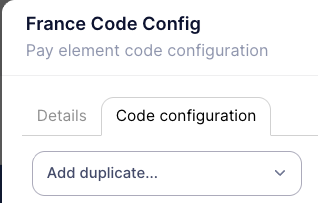
***Image 001 Add Duplicate***
Once an element to duplicate is selected the second line will appear to assign a GL code to as well as the space to assign the percent allocation.
End Date Now Picked Up from PECI
Overview
Enhancements have been made to the handling of Permanent Pay Element uploads via PECI, improving accuracy when processing additions, updates, and deletions—particularly where effective dates are supplied or defaulted.
Processing Logic
When Effective From Date Is Defaulted to the Effective Moment
- If the verb is DELETE:
- The currently active element is deleted if it exists
- If the verb is not DELETE:
- If a currently active element exists, it is updated if it differs
- If no currently active element exists and a value is supplied, a new element is added
When Effective From Date Is Supplied in the File
- If the verb is DELETE:
- The keyed element is deleted if it exists
- If the verb is not DELETE:
- If the keyed element exists, it is updated if it differs
- If the keyed element does not exist and a value is supplied, a new element is added if it differs from the currently active element
Verb Handling Rules
ADD Instruction
- Base upload, or
- XML element has an isAdded verb and all parent elements have isAdded or isUpdated verbs
UPDATE Instruction
- XML element has an isUpdated verb
- All parent elements have isUpdated verbs
DELETE Instruction
- XML element has an isDeleted verb
- All parent elements have isDeleted or isUpdated verbs
Benefits
- Improves consistency and accuracy of PECI-driven pay element updates
- Ensures correct handling of effective dates and end dates
- Reduces unintended duplicate or incorrect permanent pay elements
Payment Hub Enhancements
Overview
- Version 3.3.0 includes various enhancements to Payment Hub including:
- Improved menu icons, tool tips and warning messages
- Option to prevent new payment file creation if another version of that payment file is in progress
- Tighter controls on viewing result files and adding notes
- Amendments to reports, employee pagination