String Tokens
All string tokens are enclosed in double percent symbols (%%) and are used in reports to insert dynamic content that references data from the current period.
Pre-defined String Tokens Purpose
Release 1.16 of IPPEX Cloud introduced the ability to add a constant column to reports, where the column is given a heading name and a constant value which will appear in each row of the column.
The order in which a constant column appears in reports can be changed by dragging the field to the right place in the list in the configurator.
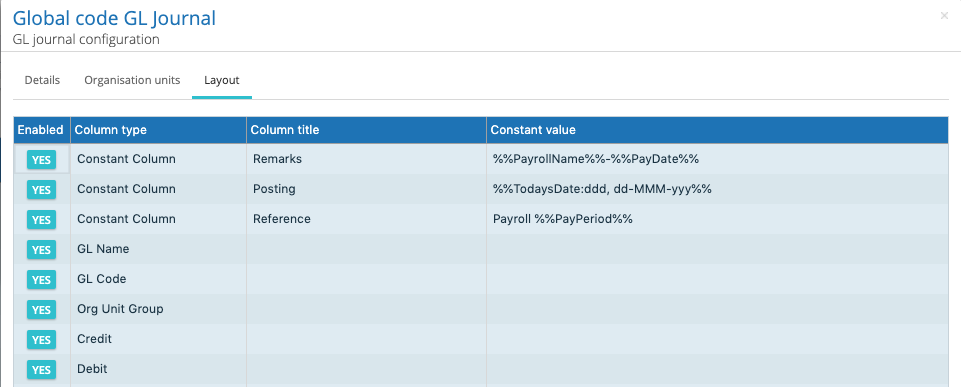
The constant column function has also been extended to include pre-defined string tokens. For example, some GL Journals contain data related to the payroll such as the pay period name, date of pay day, or today’s date. To avoid changing the constant column wording every pay period in a report configuration IPPEX has introduced the ability to insert data from other parts of IPPEX Cloud through the use of Pre-Defined String Tokens. This way the information in the report is dynamically added when the report is generated, based on the pay period chosen in the report kick-off.
The string token names are preceded and followed by a double percentage symbol ‘%%’. The double percent symbol is used to notify the application of a dynamic data request.
For example %%PayrollName%% will insert the payroll name in the constant column when the report is generated. The pre-defined words have to be exact for the system to retrieve the value. The constant column field can contain more than one key words for example %%PeriodName%% %%PayrollName%% or the key word is combined with some text e.g. %%PayrollName%% GL Journal.
String tokens have been categorised into 4 categories
- Date Strings (D Series)
- Count Strings (C Series)
- GL Strings (G Series)
- Payroll Strings (P Series)
- Payment Strings (PM Series)
Date format modifiers
The pre-defined date items can be specified to a further level of detail by optionally providing a date specifier after a colon defining the format of the date. The following are two examples:
%%TodaysDate:dd/MM/yyyy%%
%%PayDate:dddd, dd MMM yyyy%%
The default format without a specifier is based on the ISO format of (yyyy-MM-dd).
The date format strings can use the following modifiers:
- d -> Represents the day of the month as a number from 1 through 31.
- dd -> Represents the day of the month as a number from 01 through 31.
- ddd-> Represents the abbreviated name of the day (Mon, Tues, Wed, etc).
- dddd-> Represents the full name of the day (Monday, Tuesday, etc).
- h-> 12-hour clock hour (e.g. 4).
- hh-> 12-hour clock, with a leading 0 (e.g. 06)
- H-> 24-hour clock hour (e.g. 15)
- HH-> 24-hour clock hour, with a leading 0 (e.g. 22)
- m-> Minutes
- mm-> Minutes with a leading zero
- M-> Month number(eg.3)
- MM-> Month number with leading zero(eg.04)
- MMM-> Abbreviated Month Name (e.g. Dec)
- MMMM-> Full month name (e.g. December)
- s-> Seconds
- ss-> Seconds with leading zero
- t-> Abbreviated AM / PM (e.g. A or P)
- tt-> AM / PM (e.g. AM or PM
- yy-> Year, leading zero (e.g. 2015 would be 15)
- yyyy-> Year, (e.g. 2015)
- K-> Represents the time zone information of a date and time value (e.g. +05:00)
- z-> With DateTime values represents the signed offset of the local operating system’s time zone from coordinated Universal Time (UTC), measured in hours. (e.g. +6)
- zz-> As z, but with leading zero (e.g. +06)
- zzz-> With DateTime values represents the signed offset of the local operating system’s time zone from UTC, measured in hours and minutes. (e.g. +06:00)
- f-> Represents the most significant digit of the seconds’ fraction; that is, it represents the tenths of a second in a date and time value.
- ff-> Represents the two most significant digits of the seconds’ fraction in date and time
- fff-> Represents the three most significant digits of the seconds’ fraction; that is, it represents the milliseconds in a date and time value.
- ffff-> Represents the four most significant digits of the seconds’ fraction; that is, it represents the ten-thousandths of a second in a date and time value. While it is possible to display the ten-thousandths of a second component of a time value, that value may not be meaningful.
- fffff-> Represents the five most significant digits of the seconds’ fraction; that is, it represents the hundred-thousandths of a second in a date and time value.
- ffffff-> Represents the six most significant digits of the seconds’ fraction; that is, it represents the millionths of a second in a date and time value.
- fffffff-> Represents the seven most significant digits of the second’s fraction; that is, it represents the ten-millionths of a second in a date and time value.
Date Strings (D Series)
D001 – Pay date
Reports the pay date for the payroll
String – %%PayDate%%
Description
The ‘PayDate’ string token can be included in a report constant column to show the payroll pay date as configured for the IPPEX Cloud payroll being reported.
Optional date format modifiers can be used to specify the output format of the dates.
%%PayDate:yy-MM-dd%% (24-04-30)
%%TodaysDate:dd/MM/yyyy%% (24-04-2025)
%%DateOfBirth:dd MMM yyyy%% (24 Apr 2025)
The default format is ISO format yyyy-MM-dd
D002 – Todays Date
Reports the date the report was run
String – %%TodaysDate%%
Description
The ‘Todays Date’ string token can be included in a report constant column to display the date on the day the report is being run. Further level of control can be added by optionally providing a date specifier after a colon defining the format of the date.
Optional date format modifiers can be used to specify the output format of the dates.
%%PayDate:yy-MM-dd%% (24-04-30)
%%TodaysDate:dd/MM/yyyy%% (24-04-2025)
%%DateOfBirth:dd MMM yyyy%% (24 Apr 2025)
The default format is ISO format yyyy-MM-dd
D003 – Last day for the month
Reports the last day of the reporting period/month
String – %%LastDayOfMonth%%
Description
The ‘Last day of the month’ string can be included in a report constant column to display the final day of the month based on the report’s run date.
Optional date format modifiers can be used to specify the output format of the dates.
%%PayDate:yy-MM-dd%% (24-04-30)
%%TodaysDate:dd/MM/yyyy%% (24-04-2025)
%%DateOfBirth:dd MMM yyyy%% (24 Apr 2025)
The default format is ISO format yyyy-MM-dd
Count Strings (C Series)
C001 – Employee User count
Reports Active Employee Users included in a report
String – %%EmployeeUserCount%%
Description
The ‘Employee count for active users’ string token can be added to a report constant column to display the number of active users—those with IPPEX Cloud login access—for the payroll period being reported. Available to be used in report headers and report footers.
C002 – Active Employee count
Reports Active Employee included in a report
String – %%EmployeeCount%%
Description
The ‘Employee count’ string token can be included in a report constant column to show the number of active employees for the payroll period being reported. This value matches the count shown on the Payroll screen. Available to be used in report headers and report footers.
C003 – Unique Employee count
Reports Unique employees referenced in the report
String – %%UniqueEmployeeCount%%
Description
The ‘Unique Employee count’ string token can be included in a report constant column to show the number of unique employees for the payroll period being reported. Available to be used in report headers and report footers.
C004 – Unique Employee count – Permanent
Reports Unique employees with non-zero perm pay elements
String – %%perm: pay element name%%
Description
The ‘perm: pay element name count’ string token can be included in a report constant column to show the number of unique employees with non-zero permanent pay elements for the payroll period being reported. Available to be used in report headers and report footers.
C005 – Unique Employee count – Post Proc
Reports Unique employees with non-zero post processing pay elements
String – %%post: pay element name%%
Description
The ‘post: pay element name’ string token can be included in a report constant column to show the number of unique employees with non-zero post processing pay elements for the payroll period being reported. Available to be used in report headers and report footers.
C006 – Unique Employee count – Pre Proc
Reports Unique employees with non-zero pre-processing pay elements
String – %%pre: pay element name%%
Description
The ‘pre: pay element name’ string token can be included in a report constant column to show the number of unique employees with non-zero pre-processing pay elements for the payroll period being reported. Available to be used in report headers and report footers.
GL Strings (G Series)
G001 – PL/BS (Profit and Loss / Balance sheet) Account Check
Reports Adds PL/BS (Profit and Loss / Balance sheet) Account Check
String – %%PLBS_AccountCheck%%
Description
The ‘PL/BS string token is intended for use in GL reports constant column to show the profit and loss balance sheet reference for the payroll period being reported.
G002- SAP Posting Value
Reports the SAP Posting Value
String – %%SAP_PostingValue%%
Description
The ‘SAP posting value’ string token is intended for use in GL reports constant column to show the SAP posting reference for the payroll period being reported. i.e 40 to Debits, and 50 to Credits
G003 – GL Row count
Reports the numbers of rows included in a GL report
String – %%RowCount%%
Description
The ‘RowCount’ string token can be included in a report constant column to show the number of rows that are included in the associated GL report.
Payroll Strings (P Series)
P001 – Payroll – Country
Reports the ISO country code
String – %%PayrollCountry%%
Description
The ‘PayrollCountry’ string token can be included in a report constant column to show the 3-character ISO country code associated with the payroll period being reported.
P003 – Payroll – Name
Reports the Payroll Name
String – %%PayrollName%%
Description
The ‘PayrollName’ string token can be included in a report constant column to show the payroll name being used to identify the IPPEX Cloud payroll.
P004 – Payroll – Pay frequency
Reports the frequency of the payroll cycle
String – %%PayFrequency%%
Description
The ‘PayFrequency’ string token can be included in a report constant column to show the payroll pay frequency as configured when the payroll was created.
P005 – Payroll currency
Reports the default payroll payment currency for the payroll
String – %%PayrollCurrency%%
Description
The ‘PayrollCurrency’ string token can be included in a report constant column to show the default payroll currency as configured when the payroll was created.
P006 – Payment currency
Reports the default payment currency payroll cycle
String – %%PaymentCurrency%%
Description
The ‘PaymentCurrency’ string token can be included in a report constant column to show the default payroll currency as configured when the payroll was created.
P007 – Period Name
Reports the default pay period name for the reported payroll cycle
String – %%PeriodName%%
Description
The ‘PeriodName’ string token can be included in a report constant column to show the default payroll period name.
P008 – First name
Reports the employee first name found in the employee record
String – %%FirstName%%
Description
The ‘FirstName’ string token can be included in a report constant column to allow the employee first name to be placed before or after the last name or to used on its own in a report.
P009 – Surname
Reports the employee last name found in the employee record
String – %%Surname%%
Description
The ‘Surname’ string token can be included in a report constant column to allow the employee last name to be placed before or after the last name or to used on its own in a report.
Payment Strings (PM Series)
PM001 – Date of Birth
Reports the date of birth of the employee from the employee record
String – %%DateOfBirth%%
Description
The ‘DateOfBirth’ string token can be included in a payment report where the employee Date of birth is required by the banking partner to enable payments to be made.
Optional date format modifiers can be used to specify the output format of the dates.
%%PayDate:yy-MM-dd%% (24-04-30)
%%TodaysDate:dd/MM/yyyy%% (24-04-2025)
%%DateOfBirth:dd MMM yyyy%% (24 Apr 2025)
The default format is ISO format yyyy-MM-dd
Applicable Reports
The following lists identifie the report group types and which string tokens can be used with each group.
Configurable reports constant columns
The constant column value will appear on each row of the report.
The following keywords can be used to add data items to a configurable report constant column within a report:
%%RowCount%%
%%TodaysDate%%
%%PayDate%%
%%PeriodName%%
%%PayrollName%%
%%PayrollCountry%%
%%PayFrequency%%
%%PayrollCurrency%%
%%PaymentCurrency%%
%%LastDayOfMonth%%
%%FirstName%%
%%Surname%%
Configurable GL reports
The constant column value will appear on each row of the report.
The following keywords can be used to add data items to a configurable GH reports.
%%RowCount%%
%%TodaysDate%%
%%PayDate%%
%%PeriodName%%
%%PayrollName%%
%%PayrollCountry%%
%%PayFrequency%%
%%PayrollCurrency%%
%%PaymentCurrency%%
%%LastDayOfMonth%%
%%SAP_PostingValue%%
%%PLBS_AccountCheck%%
%%FirstName%%
%%Surname%%
Configurable reports Headers & footers
The following string tokens can be used to add data items to configurable reports Headers & Footers:
%%EmployeeCount%%
[The count of active EEs on payroll]
%%EmployeeUserCount%%
[The count of active EE users on payroll]
%%UniqueEmployeeCount%%
[The count of unique EEs]
%%pre: pay element name%%
[The count of unique EEs with non-zero pre-proc pay element]
%%post: pay element name%%
[The count of unique EEs with non-zero post-proc pay element]
%%perm: pay element name%%
[The count of unique EEs with non-zero permanent pay element]
Configurable payment reports
The constant column value will appear on each row of the report.
The following keywords can be used to include payments remittance information
into to a configurable payment reports.
%%TodaysDate%%
%%PayDate%%
%%PeriodName%%
%%PayrollName%%
%%PayrollCountry%%
%%PayFrequency%%
%%PayrollCurrency%%
%%PaymentCurrency%%
%%LastDayOfMonth%%
%%DateOfBirth%%