Data Upload and Period Locking
Upload is used to add pay data and employee data to a specific payroll and pay period. The upload tool is also used to create new employee details, pre-processing and post-processing pay elements. The upload tool is used to add new employees to a payroll. All employee data, employee details and pay elements are defined for a specific payroll. Each payroll will reflect the data requirements and pay element names for the local payroll processing.
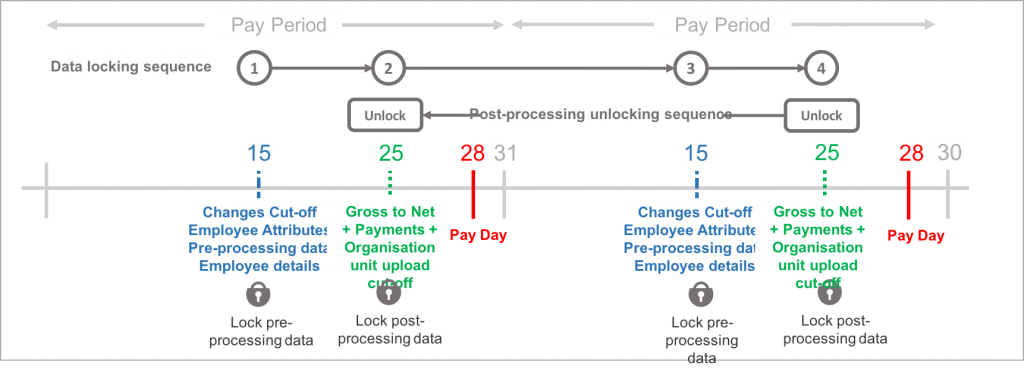
For each pay period a user must follow an upload sequence starting with changes and additions to employee records, uploading of pre-processing changes data and finally uploading of post processing gross to net data.
All data upload files must be in CSV UTF-8 format, containing a single header row (employee details or pay elements) with a single row per employee detailing the data. The employee number is the unique identifier used to match data to a specific employee. All employee details and pay elements can be translated into any language, which will enable users to view the data in their local language.
To ensure all payroll data changes are reflected in changes reports, the system has a number of specific rules for locking of pre-processing and post processing periods.
Upload
The system has five upload mechanisms:
Employee Upload: Employee personal data such as name, address, identity information, salary
Employee address upload: Employee’s address and address effective date
Employee Bank Account Upload: Employee’s bank, bank address and effective date
Pre-processing upload: Employee details, pre-processing pay element data and organisation unit values
Post-processing upload: Post-processing element data, payment values and organisation unit values
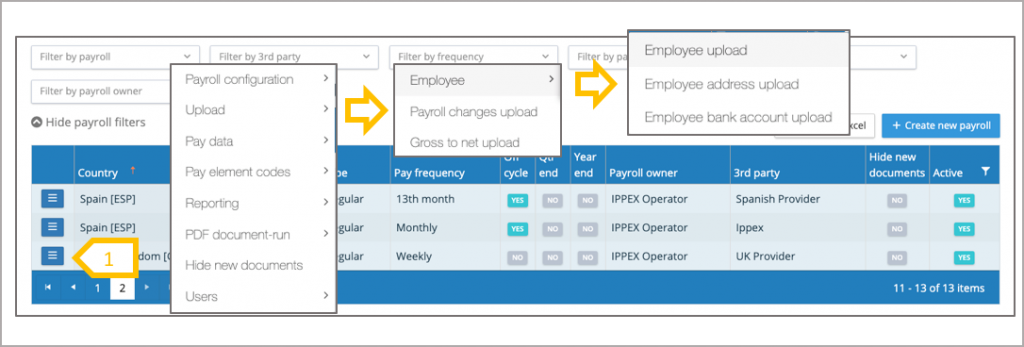
- From the action button next to a payroll select the required upload
Payroll processing cycle
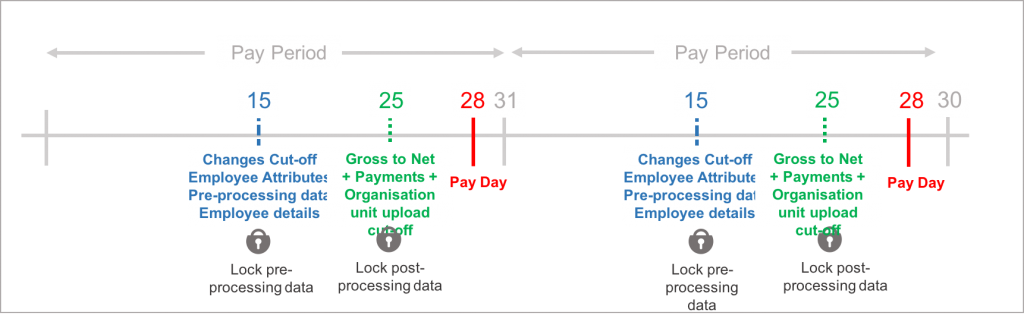
The system enables the uploading of pre and post processing data. This is a sequential process, and to provide controls on the data the system enables users with the data upload permission to lock the data which has been uploaded for each period. Data uploads can be unlocked (see rules for unlocking) to perform further uploads or data input for a given period and data type. Payroll reporting relies on the locking of data for each pay period.
Impact of pre-processing locking on changes data reports
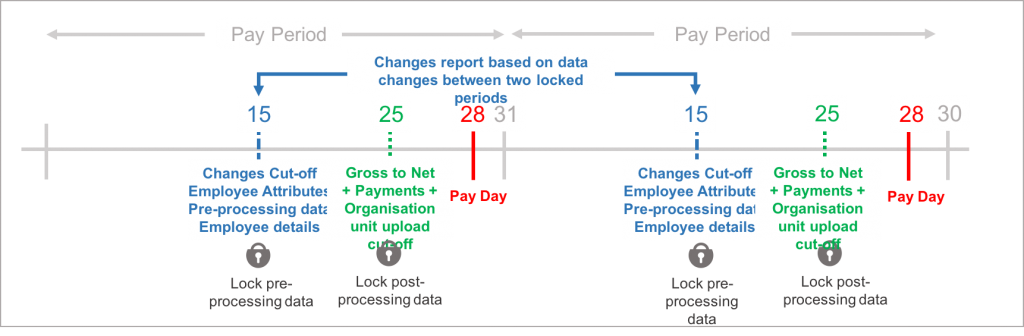
All new values added to the system are captured in a changes report which is based between two locked pre-processing periods. The system will take a record of the employee data when the pre-processing period is locked, this will be used to compare the values from the current period to the previous period to generate the changes report. If the current period pre-processing is unlocked to make further changes and re-locked, the system will take a new record of the current employee data values at the point of re-locking. Any uploads or inputs to date effective information such as salary, civil status and address has a date stamp when the information was added to the system, the changes report will list all data uploaded between the locked pre-processing periods.
Unlocking and re-locking a pre-processing period
The current pay period’s pre-processing data can be unlocked to add new data. Any that has been added to the system from the first locking of the pre-processing data and the final locking of the pre-processing period will be included in the changes report.
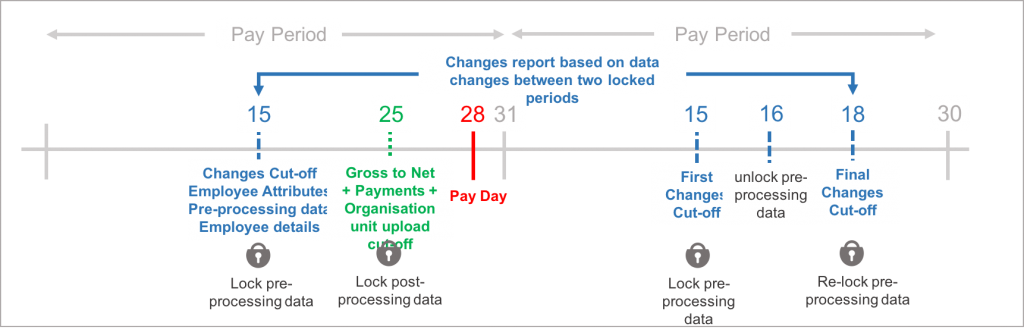
Locking rules for pre-processing data
The pre-processing data for a period can only uploaded and locked provided the preceding period’s post processing data has been locked. When the first upload of pre-processing data is performed for a pay period, it will permanently lock the previous pay period’s pre-processing data. This ensures all data captured in the current pre-processing upload appears in the changes data reports. Therefore current period’s pre-processing data can be locked and unlocked up and until the first upload is performed on the following pre-processing data.
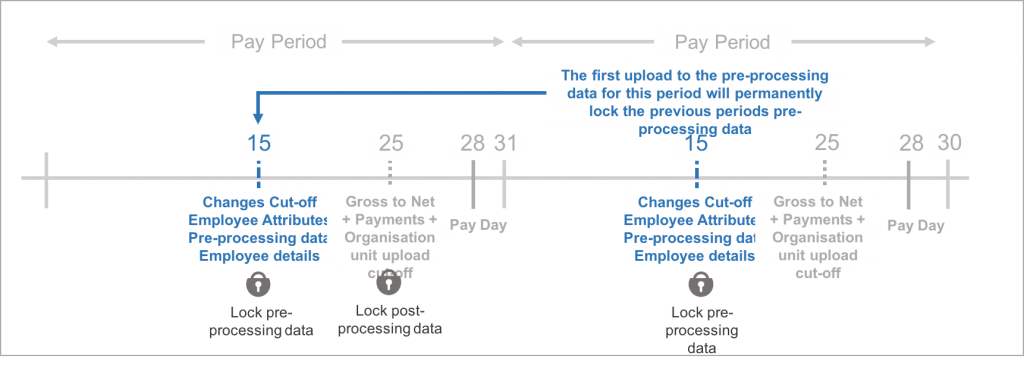
Locking and unlocking sequence
To perform uploads to pre-processing data and post-processing data, the preceding data upload has to be locked. Pre-processing to Post-processing to Pre-processing to Post-processing…….
Post processing periods can be unlocked independently from pre-processing periods to correct an earlier period’s gross to net data or organisation unit values. Post-processing data unlocks have to be performed period by period.